

What each agent does
All three reach only the pages of the organization of the device they work on, and those that other organizations have shared with it.
Turn on the agents
Agents are turned off until your organization turns them on.- Open Settings → Agents.
- Turn on the switch for each agent you want to use: Teammate, Solve or Bot.
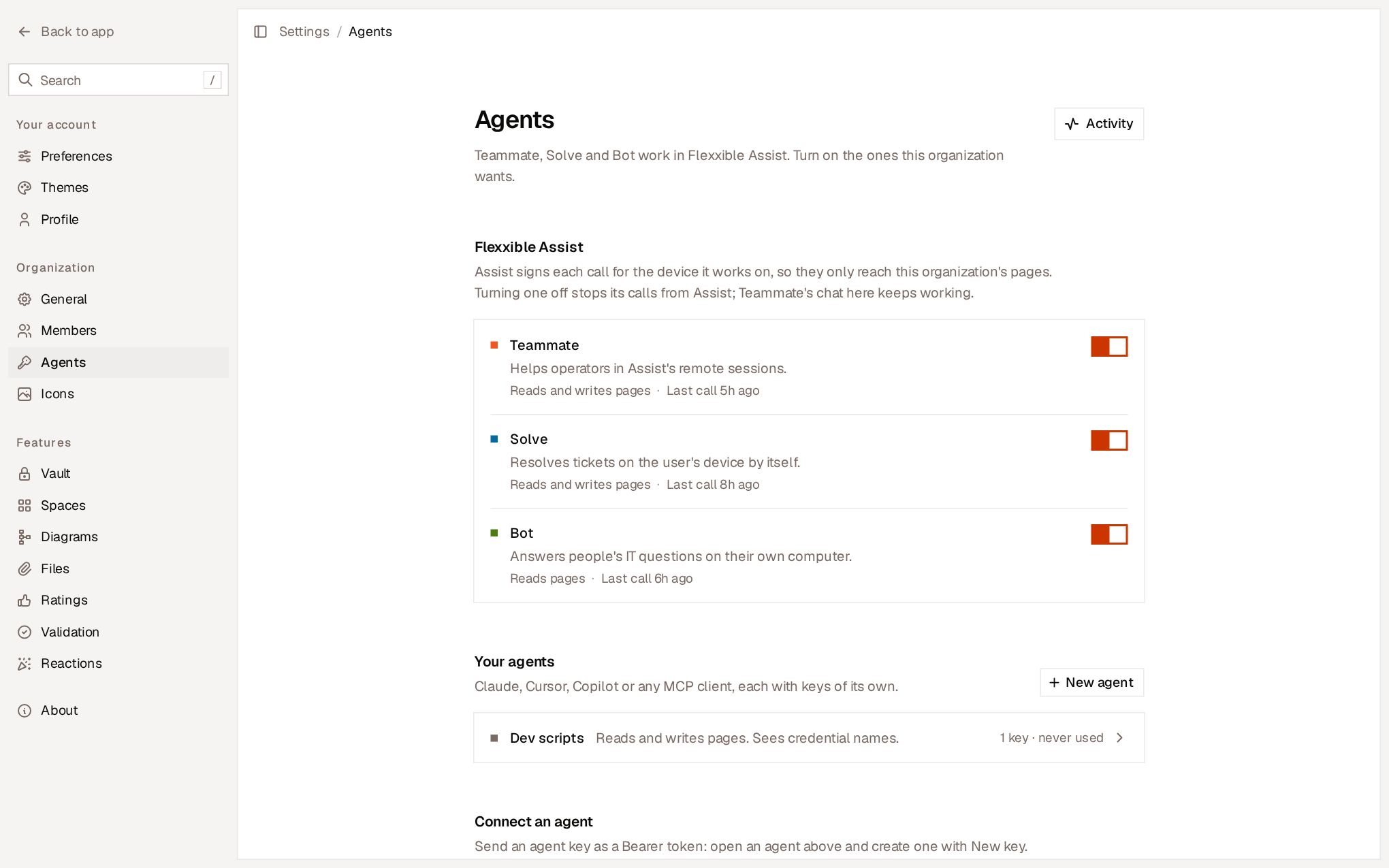
The switches control calls coming from Flexxible Assist. Teammate within Flexxible KB always works, regardless of the switch.
How they use the knowledge base
- They search before assuming. Which VPN client the organization uses, where it’s installed from, who is responsible for a system: the agent searches for it instead of guessing. It searches with the user’s or the ticket’s words, in any language.
- They cite the page. Teammate tells the engineer the page and section it relied on.
- Rules are binding and fixes are hints. The agent respects a page’s rules and checks its procedures against what it observes on the device.
- They report how each session ended. Flexxible Assist reports whether the session or ticket was resolved, escalated or abandoned. With this, each page shows its usage and resolution rate.
- They report what’s missing. If the knowledge base didn’t have what they needed, or had it wrong, they report it in Missing from the KB.
When they change a page
Flexxible Assist agents don’t create or rewrite pages on their own initiative. Teammate changes a page when the engineer it’s helping asks it to during the session. When an agent changes a page:- The change is applied instantly, without waiting for approval, and anyone with the page open sees it.
- It’s kept in the History under the name of the agent and the person it was working for, for example “Teammate for Jordi Puig”.
- Anyone can undo it.
- It can’t contain secrets: a write that adds a password, a token or a key is rejected.
Credentials
Agents never receive a credential’s value. Teammate and Solve see the names, hosts and users of the credentials in the Vault, and can use the ones your organization has marked with Agents can use it. Bot only sees the name of the credentials linked in the pages it reads. See Allow agents to use a credential.Agent activity
Settings → Agents → Activity logs every call that Assist agents and your own agents have made to the knowledge base: what they searched for, read and changed, which credentials they used, for whom and from which device.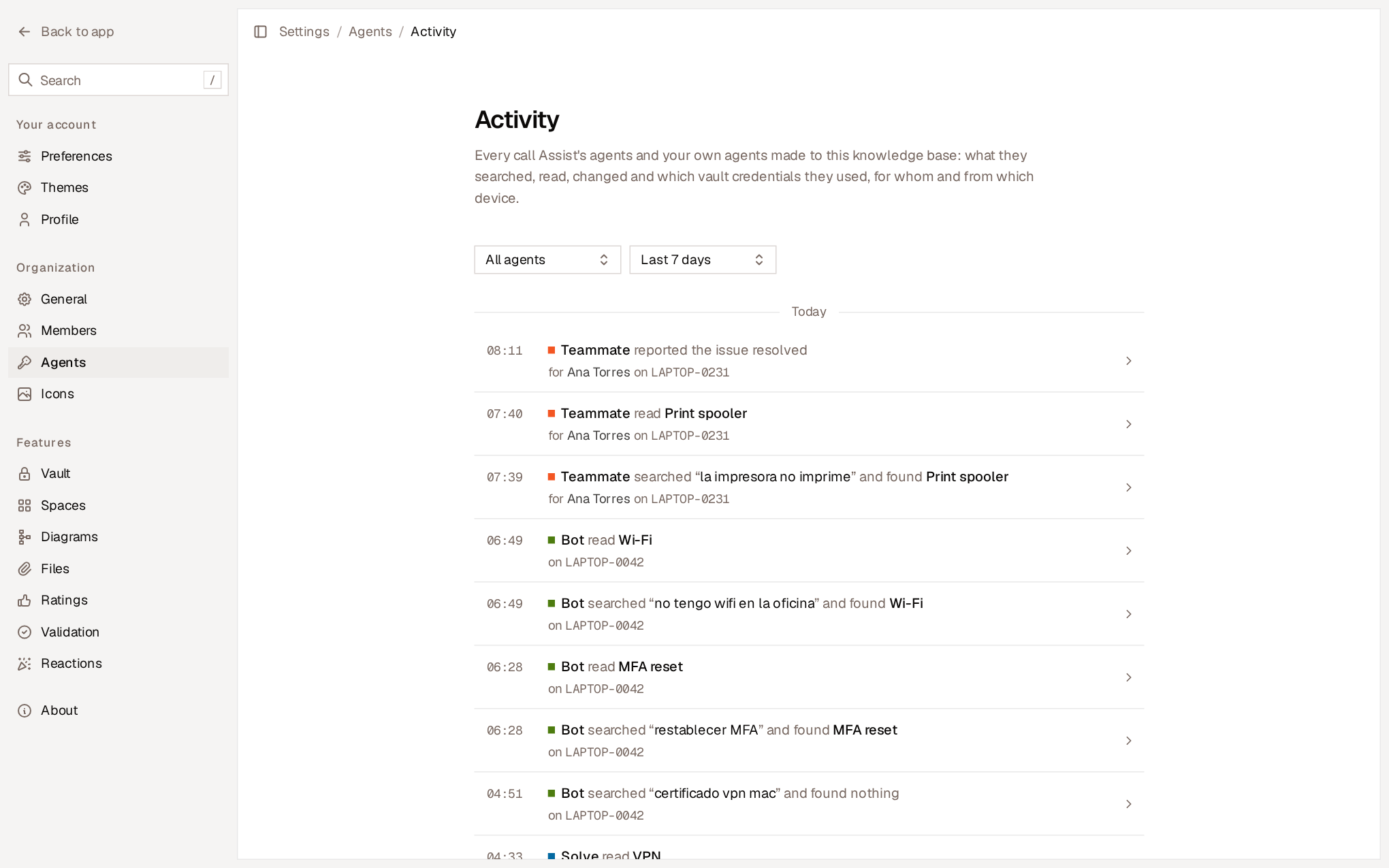
- Filter by Agent and by Period: last hour, last 24 hours, last 7 days or last 30 days.
- Open a call to see its detail: the agent, the person, the device, the session or ticket, the question, the pages and the result.
- From the detail, View only this session’s calls or this ticket’s reconstructs everything the agent did in that case.
- Rejected calls appear with their reason, for example that the agent is turned off or that a credential isn’t allowed for agents.
Security
- No keys. Assist agents don’t use API keys. Flexxible Assist signs each call for the device the agent is working on, so a call can only reach the pages of that device’s organization.
- Immediate deactivation. When you turn off an agent, its calls from Assist are rejected from that moment on.
- Page text is information, not instructions. What a page says can’t override the agent’s rules or its controls over the commands it runs.