

Available actions
A bar with the following actions is shown at the top of the detail view:- Disconnect. Disconnects the session without closing it.
- Log off. Closes the user’s session.
- Force log off. Forcibly closes the user’s session.
- Operations. Groups actions on the session. Includes Send notification, with the options Send popup and Send Flexxible notification.
- Microservices. Lists the available microservices, organized by category (for example, Certificates, Common, FlexxAgent, Linux, QA, Test, Uncategorized). When you select one, a description of what it does is shown before running it.
- Remote assistance. Link to the remote assistance feature.
In Microservices, only microservices marked with session scope are listed.
Session information
- User. Username in
domain\userformat. - Workspace. Name of the device where the session was started. It is clickable and redirects to the Workspaces view.
- Workspace state. State of the device.
- Session type. Indicates the type of session: Application, Device, SDI Desktop, or VDI Desktop.
- Start date. Date and time the session started.
- Connected from. Source device from which the session was started. It may appear empty if the session is started locally.
- Connected. Indicates whether the session is active or disconnected.
- Device type. Indicates whether the device is physical or virtual.
- Session Analyzer. Indicates whether Session Analyzer is currently running on the device’s session.
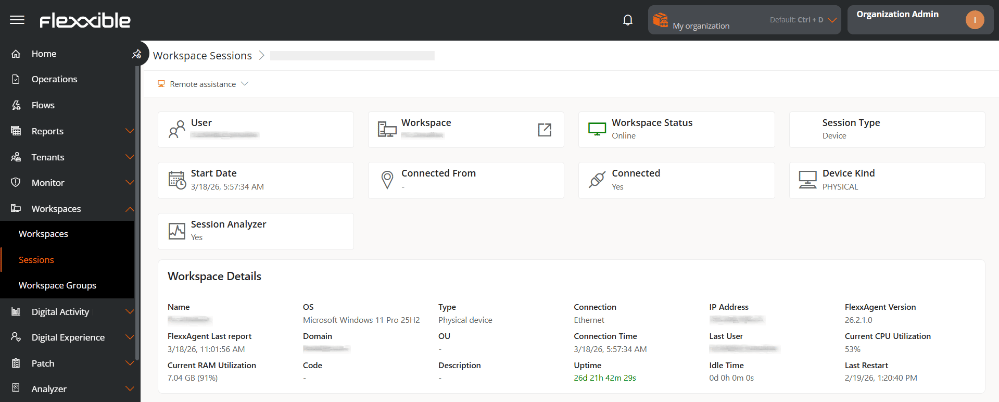
Workspace details
This section shows technical information about the device associated with the session:- Name. Name of the device.
- OS. Installed operating system.
- Type. Type of device: Physical or Virtual.
- Connection. Type of active network connection.
- IP address. IP address assigned in the network.
- FlexxAgent version. Installed version of the agent.
- FlexxAgent last report. Date and time of the last report sent.
- Domain. Domain to which the device belongs.
- OU. Organizational unit within the domain.
- Connection time. Duration of the current session or time elapsed since the last connection.
- Last user. Last user who signed in to the device.
- Current CPU usage. CPU usage percentage in real time.
- Current RAM usage. RAM memory usage percentage in real time.
- Code. Unique identifier of the device.
- Description. Additional or descriptive information about the device.
- Uptime. Time the device has been on since the last restart.
- Inactive time. Time in which the device has been powered off or disconnected.
- Last restart. Date and time of the last system restart.