

Log list
It shows a table with the list of connections along with the following information:- User. Name of the user who established the connection, in
domain\userformat. - Workspace. Name of the device where the connection was recorded. It is clickable and redirects to its detail view in Workspaces.
- Start. Date and time the connection started.
- End. Date and time the connection ended. It is empty if the connection is still active.
- Device type. Indicates whether the device is physical or virtual.
- Endpoint. Name of the client computer from which the connection to a virtual desktop was established. Shows N/A on physical devices.
- Reconnection. Indicates whether the connection is a reconnection to an existing session.
Available actions
A bar with the following actions is shown above the table:- Export. Downloads the table content in the available format.
- Reload. Refreshes the table data.
Quick filters
Two filters, active by default, are shown above the table:- Start. Filters by connection start date: Any, Today, This week, This month, This quarter, This year, or Custom.
- Visibility. Filters between All connections or only Active ones.
Table customization
The platform provides several tools to adapt the table to your needs: visible columns and filters.Columns
The Columns tab lets you customize the information shown in the table. By default, User, Workspace, Start, End, Device type, Endpoint, Reconnection, Subscription / Broker, and Pool / Catalog are shown.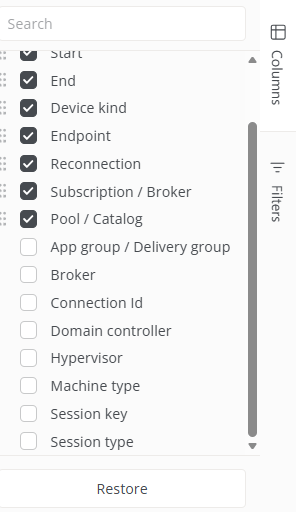
- Application group / Delivery group. Name of the Citrix/VDI application group or delivery group associated with the connection.
- Broker. Virtual desktop broker platform used (for example, Citrix On Premises).
- Connection ID. Numeric identifier of the connection.
- Domain controller. Name of the domain controller used for authentication.
- Hypervisor. Underlying virtualization platform (for example, VMware).
- Machine type. Device type.
- Session key. Unique identifier (GUID) of the session.
- Session type. Indicates whether the session is of type Device or Application.
Filters
The Filters tab lets you reduce the number of results shown in the table by selecting a column (for example, User, Workspace, Start, End, Device type, Endpoint, Reconnection, Subscription / Broker, or Pool / Catalog) and one or more values.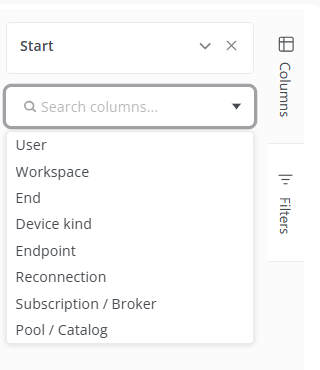
Log detail
When you click a user in the table, you access their detail view, with the following information: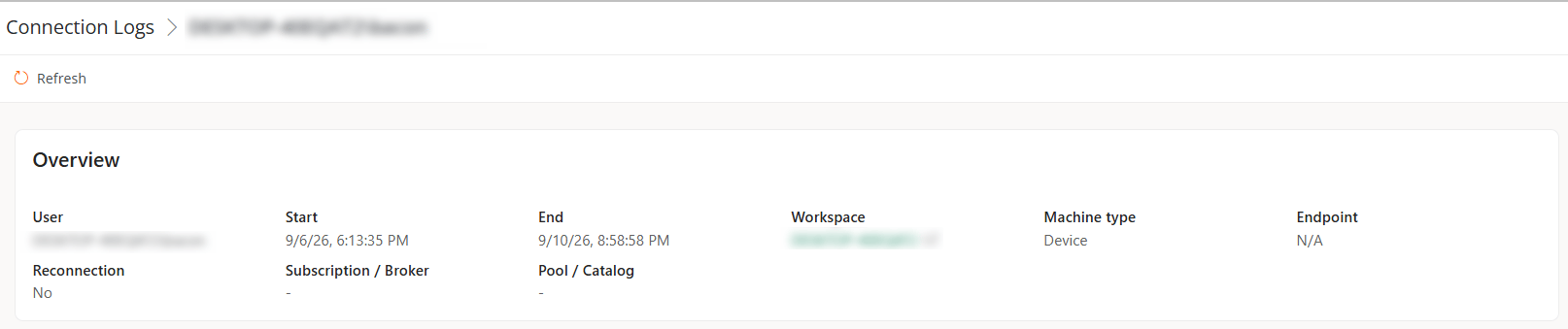
- User. Name of the user who established the connection, in
domain\userformat. - Start. Date and time the connection started.
- End. Date and time the connection ended. It is empty if the connection is still active.
- Workspace. Name of the device where the connection was recorded. It is clickable and redirects to the Workspaces view.
- Machine type. Device type.
- Endpoint. Name of the client computer from which the connection to a virtual desktop was established. Shows N/A on physical devices.
- Reconnection. Indicates whether the connection is a reconnection to an existing session.
- Subscription / Broker. Empty on physical devices; applies to virtual desktop environments.
- Pool / Catalog. Empty on physical devices; applies to virtual desktop environments.