

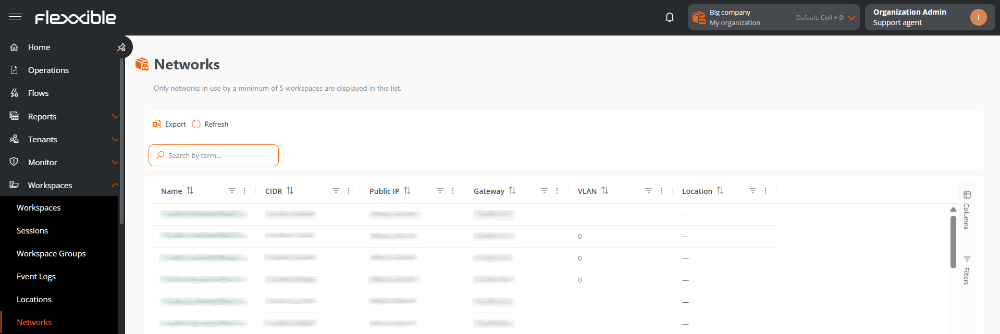
Available actions
A bar with the following actions is shown above the table:- Export. Downloads the table content in the available format.
- Reload. Refreshes the table data.
Table information
The table shows the networks detected in the organization and provides the following information:- Name. Name that identifies the network. Selecting it opens its detail view.
- CIDR. IP address range of the network, expressed in CIDR notation.
- Public IP. Public IP address from which the Internet connection is established.
- Gateway. IP address of the device that enables communication between the network and other networks.
- VLAN. Identifier of the virtual local area network (VLAN), if available.
- Location. Name of the location linked to the network. Selecting it opens its detail view.
Table customization
Columns
The Columns tab lets you customize the information shown in the table. By default, Name, CIDR, Public IP, Gateway, VLAN, and Location are shown. Additional column available:- Number of workspaces
Network detail
Selecting a network opens its detailed information, organized into the following tabs:Overview
At the top of this tab, a bar with the Reload and Edit actions is shown. Shows the main identification and connectivity data of the network:- Name. Name that identifies the network.
- CIDR. IP address range of the network, expressed in CIDR notation.
- Public IP. Public IP address from which the Internet connection is established.
- Gateway. IP address of the device that enables communication between the network and other networks.
- VLAN. Identifier of the virtual local area network (VLAN), if available.
- Location. Name of the location linked to the network. Selecting it opens its detail view.
Wireless networks
Shows the detected wireless networks that are part of the selected network. A bar with the following actions is shown above the table:- Link / Unlink. Lets you add or remove wireless networks from the network.
- Export. Downloads the table content in the available format.
- Reload. Refreshes the table data.
- SSID. Name that identifies the wireless network. Selecting it opens its detail view.
- Public IP. Public IP address from which the Internet connection is established.
- ISP. Internet service provider of the connection.
- City. Locality identified from the connection information.
- Country. Country identified from the connection information.
- Trusted. Indicates whether the wireless network is considered trusted.
Workspaces
Shows the devices connected to the selected network. A bar with the following actions is shown above the table:- Export. Downloads the table content in the available format.
- Reload. Refreshes the table data.
- Name. Name that identifies the device. It is clickable and redirects to its detail view in Workspaces.
- Current subnet. Subnet the device is currently connected to.
- Public IP. Public IP address detected for the device’s connection.
- Current machine IP. IP address assigned to the device on the local network.
- Network changed. Date and time when the device’s last network change was detected.