Highlights
🛡️ Extended antivirus information. Details are shown when a device has multiple antivirus programs installed.
🔧 Microservices. New predefined categories and option to clone microservices between sub-organizations.
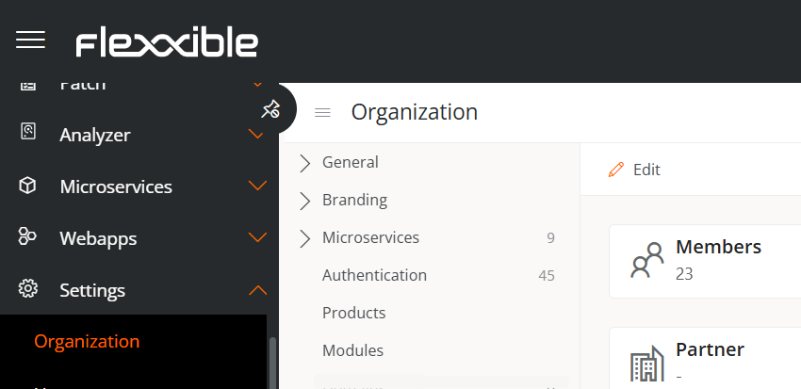
🗂️ Reorganized portal. Clearer menu with Information, Products, and Modules sections.
⚡ Optimized flows. New sidebar menu and increased minimum reuse time for greater stability.
📊 More flexible workspaces groups. Support for devices without FlexxAgent and more agile filters.
🔍 Faster searches. Better performance in event logs and jobs within Workspaces.
🛡️ CrowdStrike. Updated integration with the Alerts endpoint (API updated) and a 40% faster threat collection.
🔧 Improved API. Expanded documentation, strict validation, and search fixes.
📋 Jobs with more accurate statuses. Errors in shutdown and Wake on LAN statuses have been fixed.
👥 Mass actions. Pop-ups, disconnections, and log offs in a single batch job.
Details
🚀 New functionality
- More information on devices with multiple antivirus installed. In the Security tab of a device’s detail view in the Workspaces module, a new field showing additional information appears when more than one antivirus is installed, helping identify and prevent conflicts between security solutions. These data are also available as a column in the views of Workspaces and Servers.
🔨 Improvements
-
Predefined categories in microservices. Allow defining classification categories for microservices. This helps maintain consistency and avoid the creation of random or duplicate categories.
-
Reorganized Portal menu. The Information, Products, and Modules sections are now found in Portal -> Settings -> Organization, within the tabs: General, Products, and Modules.
-
Clone microservices in sub-organizations. Sub-organizations have the option to clone the microservices created in their environment to the main organization.
-
Improved flows
-
New format. A left sidebar menu has been added to facilitate access to all functionalities.
-
New cooldown minimum time. The minimum value has increased from 1 to 10 minutes, providing greater control and stability in flow execution.
-
Static workspaces groups without agent. Static workspaces groups can now include devices that do not have FlexxAgent active.
-
Filter optimization. Filters by workspaces groups and installed applications in the workspaces module have been improved for more agile use.
-
CrowdStrike
Transition to Alerts. The integration has been adapted to changes in the CrowdStrike API, using the Alerts endpoint instead of Detections, which is now obsolete.
Better performance. Threat detection collection is now 40% faster. And they are collected completely and without delay, even with a very high volume of logs.
Greater data consistency. The displayname field in detections now always contains valid information, preventing it from appearing empty.
-
Optimized searches
- In the Event Log list of the Workspaces module, searches and filters are faster and more efficient.
- In the Jobs section of the same module, record query performance has been improved.
-
API improvements. Documentation now includes details of the fields returned by each endpoint. Additionally, inconsistencies were fixed where numeric fields returned "" (empty string) instead of null when no values were available.
-
DeviceManagerEntries API endpoint fixes for startswith/endswith functions.
-
Stricter parameter validation in API. Previously, if an API call included a non-existent parameter, the system ignored it and executed the query, this could cause issues (e. g., writing filer instead of filter). Invalid parameters are now validated correctly, returning a 40X error instead of unexpected results.
-
Status updates for scheduled shutdown jobs. Previously, jobs were marked as Completed with errors when some machines were already shut down, causing confusion. Now the job ends as Completed.
-
Status updates for Wake on LAN jobs. Previously, jobs were marked as Completed with errors when some machines were already shut down, causing confusion. Now the job ends as Completed.
-
Bulk support for pop-up, disconnect, log off, and force log off actions. Multiple actions are now grouped into a single bulk job, simplifying execution at scale.
✅ Bug fixes
-
Fixed an issue where alert thresholds remained linked to the former tenant after a change.
-
Fixed the ability to add networks from other tenants to Locations. There is now a restriction preventing cross-assignments between tenants.
-
Fixed an issue that prevented marking notifications as attended on devices outside the domain.
-
Resolved a security vulnerability in notifications. If a notification was sent with JavaScript code, it could execute when accessing the Workspaces menu after expiring. The risk has already been eliminated.
-
Fixed a translation error when removing messaging services.
-
Fixed an issue where workspace group updates included null elements.
-
Fixed an incorrect state in remote assistance jobs when the screen closed before receiving the AnyDesk ID.
-
Optimized operation execution with overall performance and stability improvements.
-
Fixed an error that automatically changed the report group with the same title as another modified by a user, making differentiation difficult.
-
Fixed the ReportingGroup endpoint, which did not correctly apply groupby/aggregate.
-
Fixed an issue in the notification detail view on a device, which incorrectly opened navigation.
-
Fixed inconsistency in public IP information between different machine views.
Highlights
FlexxAgent version 25.9.1
🔎 UDS brokers detection. More visibility and filters.
🌐 More compatible Wake on LAN. Supports UDP 7 and UDP 9.
⚡ Improved performance in device screens with notifications.
🐞 FlexxAgent in diagnostic mode. New Agent trace logging with automatic deactivation after 24 hours.
Details about this version
🚀 New functionality
- UDS Detection. FlexxAgent now also recognizes UDS brokers. This enables filtering of devices by type of broker, improving visibility and simplifying both management and troubleshooting.
🔨 Improvements
-
Wake on LAN with greater compatibility. The Wake on LAN process also includes UDP port 9, in addition to the already supported UDP port 7. This ensures greater compatibility with different devices and network configurations.
-
Improved performance in workspace screen with notifications enabled.
-
FlexxAgent debug mode for diagnostic purposes. New diagnostic mode in FlexxAgent to help troubleshoot issues. Renamed 'Session analyzer trace logging' to 'Agent trace logging' because this option enables trace logging for FlexxAgent too collecting event log events every minute. The trace logging is automatically deactivated after 24 hours.
✅ Bug fixes
-
Fixed an error in power actions on Azure virtual machines after the agent starts. Power commands now work correctly after initialization.
-
Resolved the “Access Denied” error during some installations.
-
Fixed an installation failure of FlexxAgent when the expected path did not exist.
-
Resolved an issue where microservice condition-based flows stopped executing if FlexxAgent started without a network connection.
-
Fixed an error where the FlexxAgent installation job failed, even though the installation was successful.
-
Resolved an issue where installed applications did not report all existing applications.
-
Fixed an issue where pop-up messages did not fail when an error occurred.
-
Corrected language discrepancy in pop-up messages that did not match the user's configured language.
-
Solved an error where virtual machines running on Hyper-V over Windows were detected as physical devices.
-
Fixed detection of remote PCs with Parallel RAS, which were not correctly identified.
-
Fixed a bug in the detection of the Flexxible Remote Assistance (FRA) form after a reconnection in attended remote assistance that sometimes prevented the connection even after accepting from the target device.
-
Fixed an issue where remote support tools could run before the user accepted in attended sessions.
-
Fixed an issue in unattended remote assistance notification. If the process closed or the user ended it, the notification did not reappear.
-
Resolved an issue in workspace group creation, where the required name field was not validated.
Highlights
FlexxAgent Universal version 25.8.501.179
✅ Web Apps on Windows. FlexxAgent now supports the Web Apps feature in Windows environments.
⚡ Performance Boost. Several internal improvements reduce resource consumption and optimize overall speed.
🛡️ Better Stability. Fixed issues with remote assistance sessions, notifications, and reporting of system metrics (apps, processes, CPU, etc.).
🔒 Improved Reliability. Stronger error handling in Flows, IoTHub connections, and agent updates.
📊 Clearer Insights. Enhanced logs, antivirus detection, and reporting accuracy across devices.
⏱️ Longer API timeout to improve stability in environments with large amounts of data.
🌐 Flexible Wake on LAN configuration at the report group level.
🔒 Security improvements in Analyzer and revocation of compromised AES key.
🧾 Agent messages are now logged for better traceability.
⚙️ The action Force update custom fields is processed in backend to avoid blocks.
🧠 New flexxibleMID and EDR fields in the API for more context.
🧩 API jobs show the access name.
🕓 Better diagnostics in Service Bus errors.
📊 FlexxAgent flows and microservices are registered as jobs in Workspaces.
Details about this version
🚀 New functionality
- Web Apps support in Windows. FlexxAgent now supports the Web Apps feature on Windows operating systems.
🔨 Improvements
-
Multiple internal performance and resource consumption optimizations.
-
Backend URL is now used as the primary point to download FlexxAgent updates.
-
Improved detection of session agent and closed sessions.
-
Improved token expiration handling in connections to Analyzer.
-
FlexxAgent diagnostic and error information is now sent using backend URL.
-
Added detection of Hyper-V hypervisors in Windows 10 and Windows 11 virtual machines.
-
Improved pre-loading of modules in PowerShell microservices.
-
Improved log messages for antivirus detection in Windows Server when information is unavailable.
-
Improved log messages in Flows evaluation and execution.
-
Improved logging during installation and update processes.
-
Reduced FlexxAgent log retention period.
-
Better handling of remote assistance exceptions when a workspace is shutting down.
-
Reduced log verbosity and improved controls for IoT Hub reconnections during FlexxAgent startup.
-
Default proxy now set to HTTP if no protocol is defined in agent configuration.
-
Added additional status information for attended remote assistance sessions.
✅ Bug fixes
-
Solved an issue where long device names may be truncated when reported to the backend.
-
Fixed an issue where the session agent might not restart automatically after 24 h.
-
Solved punctual internal agent communication errors in Flows.
-
Improved popup reliability.
-
Fixed an issue where the remote assistance window did not appear in a second dynamic session.
-
Fixed an issue where the Accept/Reject buttons in remote assistance did not always appear.
-
Solved an issue retrieving hard disk information via WMI.
-
Corrected reporting of the printed pages metric.
-
Fixed an issue where not all installed apps were being reported properly.
-
Fixed timeout errors executing custom conditions in flows.
-
Fixed timeout errors calculating custom fields.
-
Fixed control issues when reconnecting to IoT Hub with a pre-existing connection.
-
Fixed error in Health checker process validating FlexxAgent’s certificate.
-
Solved an issue where old FlexxAgent logs were not removed from the disk.
-
Fixed incomplete reporting of Windows process information.
-
Corrected reporting of number of logical processors.
⚠️ Known Issues
-
Restart operations may not send proper status information to backend and could remain marked as “pending.”
-
Missing detailed list information in some operation responses.
-
Notifications may remain visible to users after their defined end date.
-
Pop-up notifications may not close automatically after 3 days as expected.