Organization types
The platform distinguishes three types of organizations:- Partner-type organizations
- Customer-type organizations
- Sub-organizations
Partner-type organizations
- They have the authority to grant administrative access to customer-type organizations (tenants) that depend on them.
Customer-type organizations
- They have the option, if they wish, to segment their organization into multiple sub-organizations to facilitate delegated administration.
- They can always see all their device fleet, regardless of who they have delegated management to.
- They can link their Analyzer instance to their sub-organizations or assign a new one.
- They have their own configurations.
- Multiple customer-type organizations can have the same partner as a service provider.
Sub-organizations
- They are subdivisions of a complex organization, management units established according to the implementation’s requirements.
- They are very helpful in very large environments, with broad user distribution and multiple service providers or highly segmented technical teams.
- They do not have a subscription of their own; they use the subscription of the customer-type organization that manages them.
- Each sub-organization can only see its information in Workspaces. It cannot access information from other sub-organizations or from the customer-type organization that manages it.
- They inherit the configuration of the customer-type organization that manages them, although it can be edited. They also inherit the FlexxAgent configuration, but that one is not editable.
Customer-type organizations can create sub-organizations at a lower level. Sub-organizations cannot be created from another sub-organization.
Tenants list
The list view shows a table with the list of organizations (tenants) whose administration is delegated. It includes information about the Flexxible product they hold, their policy, and creation date.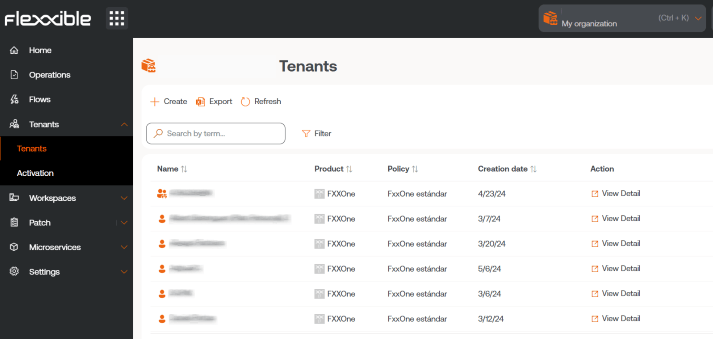
Tenant interface
If the user clicks on a tenant’s name in the table, the interface redirects to the selected tenant’s home page. This action is very useful because it speeds up consulting data from one organization or another. The platform will not return to the default organization, even if the page is refreshed. To return, there are three options:- Ctrl + D (Cmd + D on Mac).
- Ctrl + K + O (Cmd + K + O on Mac).
- Directly select the default organization in the organization selector, located in the upper right.
Activation
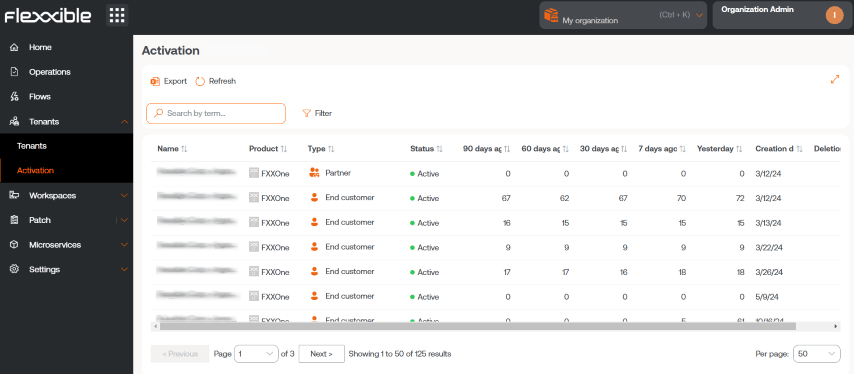
This section lets managed service providers (MSPs) evaluate the evolution of FlexxAgent installations or deployment in the customer-type organizations in which they have delegated administration. The table in the list view shows the tenants’ names. If it is a sub-organization, its name will be preceded by that of the organization managing it; for example: Customer A > Sub-organization-01. This naming convention is adopted because sub-organizations inherit the FlexxAgent configuration of the customer-type organization that manages them. The table also indicates the Flexxible product held by the tenant, the corresponding organization type, and time indicators that help you understand the evolution of FlexxAgent adoption in the organization. The time indicators offered by the table are 90 days ago, 60 days ago, 30 days ago, 7 days ago, and Yesterday. Each field specifies the number (units) of active agents at that given moment.