

To access this feature, contact your Flexxible representative.
Version configuration
To manage FlexxAgent versions, the environment must have at least version 25.4.1 installed.Configuration steps
-
Go to Settings → FlexxAgent version.
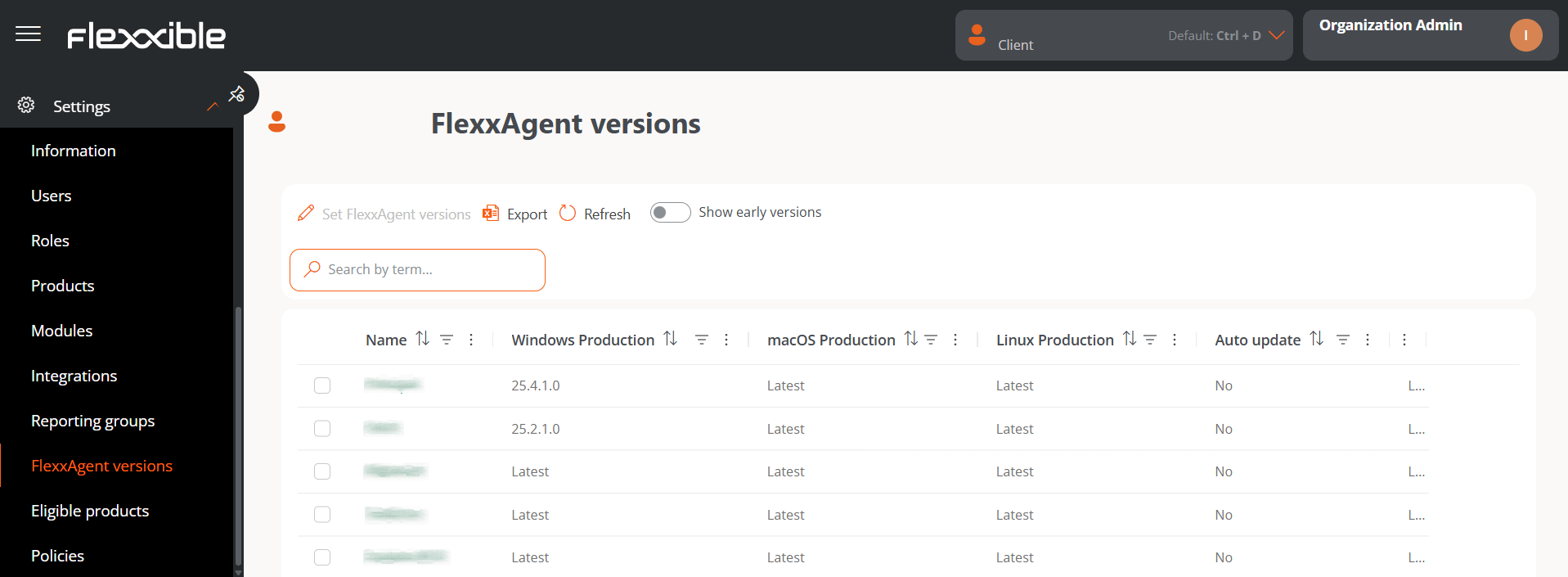
- Name. Name of the reporting group.
- Windows production. Version number set for Production on Windows.
- macOS production. Version number set for Production on macOS.
- Linux production. Version number set for Production on Linux.
- Automatic update. Defined from the reporting group configuration. It will always point to Production environments, not Early.
- Early is the test environment, where an operator can review whether the version specified in this field is suitable for the organization’s needs. It is recommended to keep it on Latest.
- Production is the live environment. The version specified in this field will apply to all production devices of the selected reporting groups.
- Select one or more reporting groups in the table to configure the FlexxAgent version of their devices.
-
Click Set FlexxAgent versions. In the form, configure the version number for each of the two available environments: Production and Early, on all operating systems. It also lets you choose whether or not to enable automatic FlexxAgent updates.
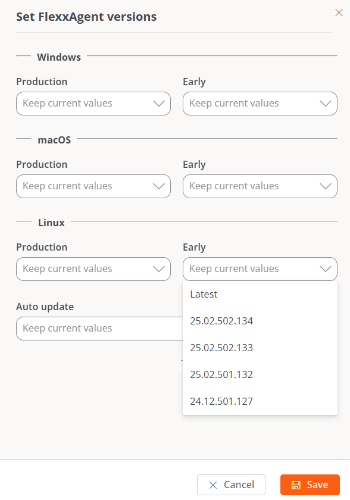
- Click Save.
When a lower version of FlexxAgent is applied (downgrade), the version currently installed is automatically uninstalled to install the configured version; in addition, devices lose access to features that correspond to more recent versions.