Audit list
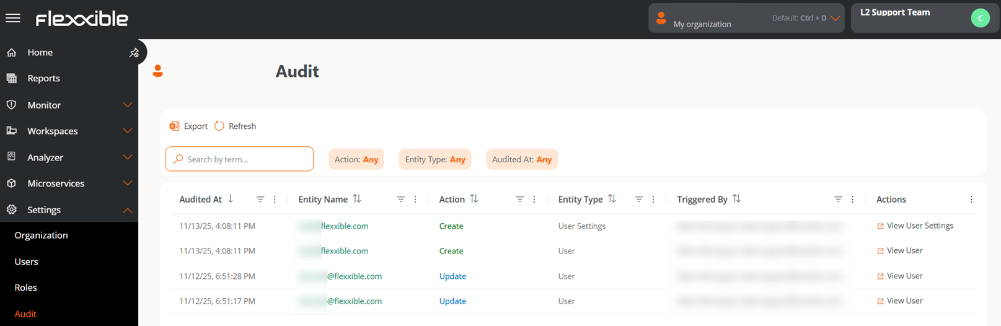
Each record in the list shows the following information:- Audited on. Date and time the action was executed.
- Entity name. Object on which the action was performed. Clicking it opens its details view.
- Action. Type of change recorded: Creation, Update, or Deletion.
- Entity type. Classification of the audited object. Can be User, User settings, or Tenant.
- Executed by. User who performed the action (the name and email are shown).
- Actions. Depending on the entity type, this provides access to its corresponding section in the platform; for example, for User and User settings entities, the Users section will open.
Audit details
- Go to Settings → Audit.
-
In the table, select the Entity name.
At the top of the view, summary cards show the main information:
- Audited on. Date and time of the action.
- Action. Type of event performed: Creation, Update, or Deletion.
Overview
- Entity name. Object on which the action was recorded.
- Entity type. Classification of the audited object (User, User settings, or Tenant). From here you can access the entity’s details.
- Username. User who executed the action.
- Email. User’s email address.
- Organization. Organization the modified object belongs to.
Summary
Shows an AI-generated message that briefly describes the recorded action.What changed
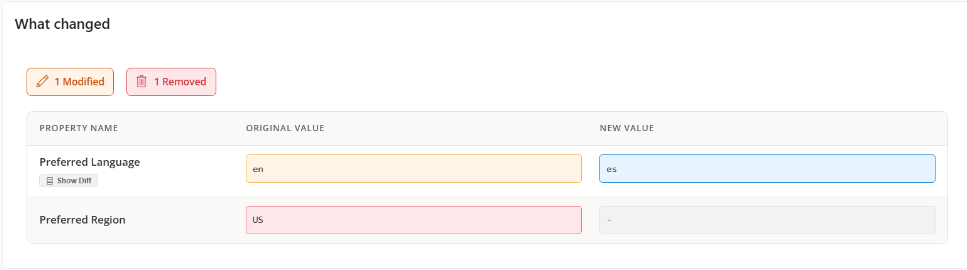
Presents a table with the changes detected in the audited entity:- Property name. Attribute that was modified.
- Original value. Value before the modification.
- New value. Updated value after the modification.