

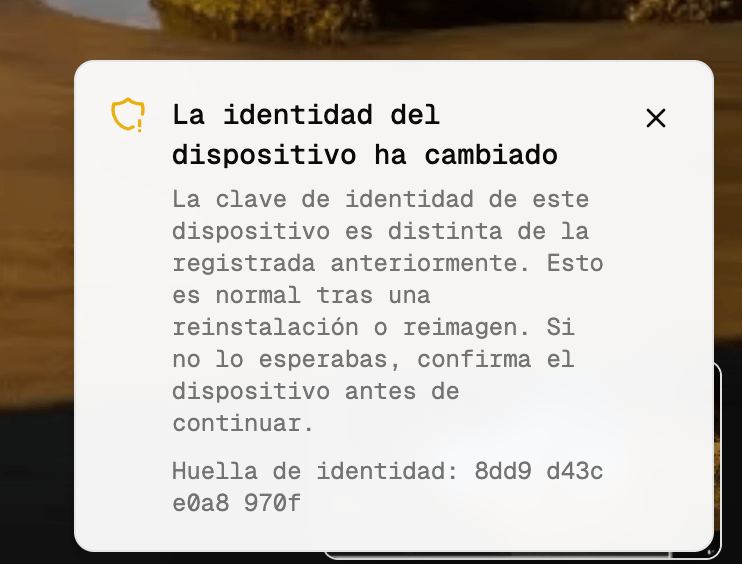
The device identity has changed This device’s identity key is different from the one previously registered. This is normal after a reinstallation or reimage. If you did not expect it, confirm the device before continuing.The warning does not block anything. The session is established normally, end-to-end encryption remains active, and the operator can close it as soon as they have read it. In most cases there is a simple explanation, such as a reinstallation or a non-persistent virtual desktop. This page explains what Flexxible Assist checks, why this warning exists, and how to interpret it.
What Flexxible Assist checks
Each device with Flexxible Assist generates its own identity key the first time the agent starts. The key is created on the device itself, stored there, and never leaves it. Flexxible neither issues it nor knows it.- On Windows it is stored in
C:\ProgramData\Flexxible\Assist, protected with machine-level DPAPI. - On macOS it is stored in
/Library/Application Support/com.flexxible.assist. - On Linux it is stored in
/var/lib/flexxible-assist.
- It verifies that the device has signed the session key exchange with its identity key. If the signature is not valid, the viewer rejects the session with the message The device identity could not be verified.
- It compares the key with the one it had registered. If it is different, it shows this warning and lets the session continue.
The workspace identifier is not a secret: it appears in the FlexxAgent configuration, in the logs, and in support tools. Without the identity key, anyone who knew that identifier could impersonate the device. The key guarantees that the device you connect to today is the same one you connected to yesterday.
When it appears
The warning appears when the device’s identity key has changed since it was last registered. Once the new key is registered, the warning is repeated in every session with that device for the 24 hours following the change. After that time it stops appearing until the key changes again. A device’s first connection does not show any warning. At that point there is no previous key to compare against.If a device goes more than 12 months without connecting, its registration expires. The next connection counts as a first connection and does not show the warning either.
Common reasons the warning may appear
The key lives on the device’s disk. Any operation that replaces or erases that disk generates a new key on the next startup, and with it the warning. These are the most frequent cases, and none of them indicates a problem:- Reinstallation of Flexxible Assist. Uninstalling removes the directory where the key is stored. When you install again, the agent generates another one.
- Device reimage. Redeploying the corporate image, reinstalling the operating system, or resetting the device to factory settings.
- Restore from a backup or snapshot. If the backup predates the moment the current key was registered, the device reverts to the old key or to none.
- Non-persistent virtual desktops. Each startup begins from the base image, so the agent generates a new key every time. In these fleets the warning is normal and will appear in almost every session.
- Hardware replacement. Changing the disk or the motherboard. On Windows, the key is also bound to the machine through DPAPI: if the machine changes, the file can no longer be read and the agent creates a new key.
Reasons worth reviewing
If the warning appears and does not match any of the situations above, it is worth spending a minute on it:- Two devices with the same workspace identifier. This happens, for example, with a cloned machine that was not generalized. Each one has its own identity key, and every time a different one connects the warning reappears. While one of the two is connected, the service rejects the connection from the other, so you will also notice the device going online and offline.
- The warning repeats for days on a device that nobody has reinstalled. This usually indicates that the agent cannot save its key to disk, for example due to a permissions problem in the directory, and therefore generates a new one on every startup.
- Nobody can explain the change. An identity change that does not match the device’s history may be an impersonation attempt. It is unlikely, but it is exactly the case this warning exists for.
What to do when you see the warning
- Check whether there is a known cause: reinstallation, reimage, restore, or non-persistent virtual desktop. If there is, close the warning and continue normally.
- If there is not, confirm that the device is the expected one. Ask the user in front of it or check the device name, last boot, and inventory in Flexxible Portal.
- If in doubt, end the session and open a ticket with Flexxible support, indicating the workspace and the identity fingerprint shown in the warning.