> ## Documentation Index
> Fetch the complete documentation index at: https://docs.flexxible.com/llms.txt
> Use this file to discover all available pages before exploring further.
# Uninstall protection
Uninstall protection prevents users from uninstalling FlexxAgent from their devices.
Configuration can be applied at the **Product** or **Reporting group** level, and can only be managed by users with the **Organization Administrator** role.
This feature is disabled by default.
### Configuration at the Product level
1. Go to **Settings** → **Organization**.
2. Select the **Products** tab.
3. In the table, locate the desired product and click **Agent settings** in the **Action** column.
4. Enable or disable the **Uninstall protection** option.
5. Click **Save**.
### Configuration at the Reporting group level
The configuration can be applied to one or more reporting groups.
#### Configure protection for a reporting group
1. Go to **Settings** → **Reporting groups**.
2. In the table, locate the desired reporting group and click **Agent settings** in the **Action** column.
3. Edit the **Uninstall protection** option using the corresponding edit button.
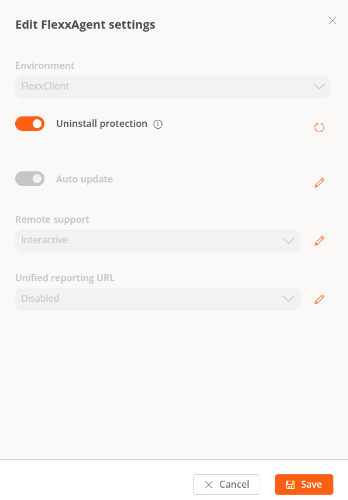 4. Select the desired state.
5. Click **Save**.
Reporting groups inherit the configuration defined at the Product level. However, they can override this configuration individually.
#### Configure protection for multiple reporting groups
1. Go to **Settings** → **Reporting groups**.
2. Select the desired reporting groups in the table.
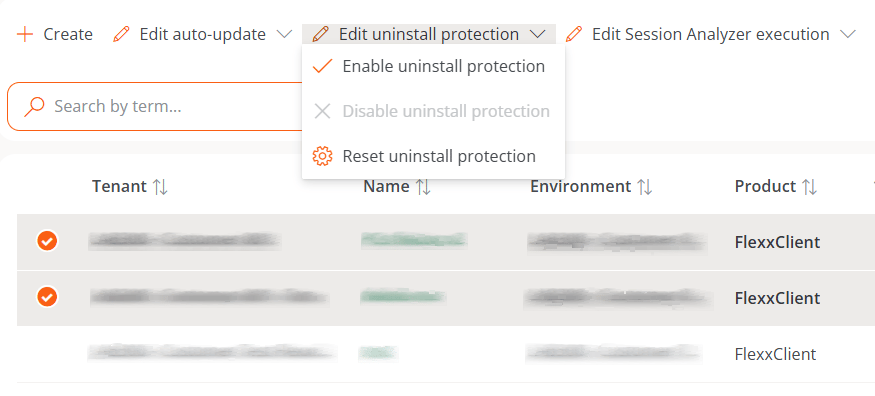
3. Click **Edit uninstall protection**.
The following options will be displayed:
* **Enable uninstall protection.** Prevents the uninstallation of FlexxAgent in the selected reporting groups. This option will not be available if protection is already enabled at the Product level.
* **Disable uninstall protection.** Allows FlexxAgent to be uninstalled in the selected reporting groups. This option will not be available if protection is already disabled at the Product level.
* **Reset uninstall protection.** Restores the configuration inherited from the Product each reporting group belongs to.
4. Select the desired state.
5. Click **Save**.
Reporting groups inherit the configuration defined at the Product level. However, they can override this configuration individually.
#### Configure protection for multiple reporting groups
1. Go to **Settings** → **Reporting groups**.
2. Select the desired reporting groups in the table.
3. Click **Edit uninstall protection**.
The following options will be displayed:
* **Enable uninstall protection.** Prevents the uninstallation of FlexxAgent in the selected reporting groups. This option will not be available if protection is already enabled at the Product level.
* **Disable uninstall protection.** Allows FlexxAgent to be uninstalled in the selected reporting groups. This option will not be available if protection is already disabled at the Product level.
* **Reset uninstall protection.** Restores the configuration inherited from the Product each reporting group belongs to.
 ### Inheritance behavior
A device will have uninstall protection enabled in any of the following cases:
* Protection is explicitly enabled in the reporting group it belongs to.
* The feature is unset in the reporting group (neither enabled nor disabled), but it is enabled at the Product level.
### Uninstalling with protection enabled
If uninstall protection is enabled, there are two ways to uninstall FlexxAgent.
#### Option 1: Move the device to another reporting group
Move the device to a reporting group that does not have uninstall protection enabled.
#### Option 2: Use an uninstall token
1. From the platform menu, go to **Workspaces** and select the device.
2. Run the **Reveal uninstall token** action.
3. Copy the generated token.
The token is unique for each device and remains valid until 23:59:59 UTC on the day after it was generated.
Once you have the token:
1. Open the Windows Control Panel.
2. Start the FlexxAgent uninstall process.
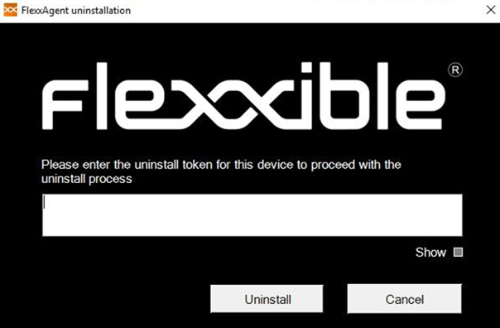
3. Enter the token when prompted.
### Inheritance behavior
A device will have uninstall protection enabled in any of the following cases:
* Protection is explicitly enabled in the reporting group it belongs to.
* The feature is unset in the reporting group (neither enabled nor disabled), but it is enabled at the Product level.
### Uninstalling with protection enabled
If uninstall protection is enabled, there are two ways to uninstall FlexxAgent.
#### Option 1: Move the device to another reporting group
Move the device to a reporting group that does not have uninstall protection enabled.
#### Option 2: Use an uninstall token
1. From the platform menu, go to **Workspaces** and select the device.
2. Run the **Reveal uninstall token** action.
3. Copy the generated token.
The token is unique for each device and remains valid until 23:59:59 UTC on the day after it was generated.
Once you have the token:
1. Open the Windows Control Panel.
2. Start the FlexxAgent uninstall process.
3. Enter the token when prompted.
 Before managing uninstallation via tools such as Microsoft Intune or custom scripts, devices must be moved to a reporting group that has uninstall protection disabled.
Flexxible recommends keeping at least one reporting group with uninstall protection disabled to make maintenance and device decommissioning tasks easier.
Before managing uninstallation via tools such as Microsoft Intune or custom scripts, devices must be moved to a reporting group that has uninstall protection disabled.
Flexxible recommends keeping at least one reporting group with uninstall protection disabled to make maintenance and device decommissioning tasks easier.