> ## Documentation Index
> Fetch the complete documentation index at: https://docs.flexxible.com/llms.txt
> Use this file to discover all available pages before exploring further.
# Windows (previous versions)
FlexxAgent supports 64-bit Windows operating systems; it cannot be installed on 32-bit systems. The installation binary is available with or without a graphical interface, so it is compatible with both unattended deployment methods and wizard-based installation.
 ## Service architecture
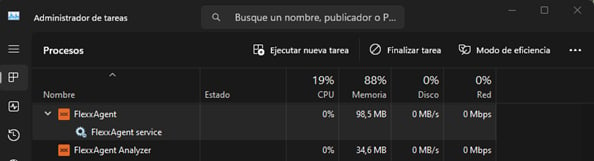
FlexxAgent consists of a Windows service called **FlexxAgent Service**, which coordinates two processes:
* *FlexxAgent*, running at the system level
* *FlexxAgent Analyzer*, started for each user session.
This architecture allows FlexxAgent to manage devices with multiple sessions (such as terminal servers, Citrix, or AVD) and obtain detailed metrics to improve diagnostic capabilities.
#### Example:
* On a laptop, *FlexxAgent* (at the system level) and *FlexxAgent Analyzer* (under the user's identity) are running.
* On a device with multiple sessions, in addition to *FlexxAgent*, one *FlexxAgent Analyzer* process will run per session.
## Resource consumption
FlexxAgent is optimized to minimize resource usage. Approximate values are:
* Disk space: \< 200 MB
* CPU: \< 0.5%
* RAM: 100-200 MB
### FlexxAgent process (system)
* Collection of performance, hardware, session, profile, disk, partition, and Windows service information: **every 60 seconds**.
* Sending of error events from the event log: **every 10 minutes**.
* Update of user profile information: **every 15 minutes**.
### FlexxAgent Analyzer process (user)
* Analyzes application usage, diagnostic data, and user experience.
* Local data collection: **every 15 seconds**.
* Sending of reports to the service: **every 5 minutes** (this metric may change for specific features).
## Supported versions
FlexxAgent is compatible with Windows operating systems currently within Microsoft's support lifecycle. Although it can be installed on unsupported versions:
* Windows 7 SP1
* Windows 8.1 SP1
* Windows Server 2008 R2 SP1
* Windows Server 2012
On these versions, some features may not be available.
## Software requirements
FlexxAgent requires the following components:
* **.NET Framework 4.6.2 or later** (recommended: .NET Framework 4.8).
* **Windows PowerShell 4.0 or later** (PowerShell 5.1 recommended).
* Note: The Azure PowerShell execution policy must be set to *Unrestricted*.
## Considerations for Windows versions in EOL
On systems that are out of support (EOL), FlexxAgent may have limitations or lack compatibility with certain features.
### Unsupported features
When FlexxAgent is used on older Windows operating systems that are out of support, the following features are not supported:
* Collection of GPU consumption metrics.
* Flow execution.
* Execution of microservices by the end user.
* Retrieval of storage drive information.
* For virtual devices, broker and hypervisor detection (limited depending on the vendor).
* User Input Delay (UID) (only available starting with Windows Server 2019 and Windows 10 version 1809).
Broker detection may not work for all of them.
There is no user input delay performance data, as this counter does not exist in Windows 7 or Windows Server 2008 R2.
#### Windows 7 and 2008 R2
FlexxAgent can be installed on Windows 7 x64 or Windows Server 2008 R2 SP1 under the following conditions:
* Install update [KB4474419](https://support.microsoft.com/en-us/topic/sha-2-code-signing-support-update-for-windows-server-2008-r2-windows-7-and-windows-server-2008-september-23-2019-84a8aad5-d8d9-2d5c-6d78-34f9aa5f8339): (*SHA-2 code signing support update for Windows Server 2008 R2, Windows 7, and Windows Server 2008: September 23, 2019*).
* Install update [KB3140245](https://support.microsoft.com/en-us/topic/update-to-enable-tls-1-1-and-tls-1-2-as-default-secure-protocols-in-winhttp-in-windows-c4bd73d2-31d7-761e-0178-11268bb10392): (*Update to enable TLS 1.1 and TLS 1.2 as default secure protocols in WinHTTP in Windows*) and follow the instructions in the *How to enable TLS 1.1 and TLS 1.2 as default secure protocols in WinHTTP in Windows* section of the Microsoft support page.
* Requires at least **.NET Framework 4.6** (recommended: 4.8).
* PowerShell 2.0 with Windows 7 is not compatible with TLS 1.2; install **Windows Management Framework 5.1**, which includes PowerShell 5.1.
#### Windows 8 and 2012
FlexxAgent installation supports Windows 8 under the following conditions:
* Requires **.NET Framework 4.6.2** (Microsoft blocks the installation of later versions on Windows 8.0).
* All Windows security updates must be applied to ensure compatibility with **TLS 1.2** and **SHA-2** code signing.
## Unattended deployment
FlexxAgent supports unattended deployment via GPOs, Intune, SCCM, or other distribution tools.
### Installation
Unattended installation of FlexxAgent is performed via PowerShell.
```
Start-Process "\FlexxAgent-Installer.exe" -ArgumentList "" -WindowStyle Hidden -Wait
```
### Supported parameters
| Parameter | Type | Description |
| ------------------ | --------- | --------------------------------------------------------------------------------------------------- |
| proxyAbsoluteUri | \[string] | Proxy URL and port. |
| proxyUser | \[string] | User for authenticated proxy. |
| proxyPass | \[string] | Password for authenticated proxy. |
| proxyPersistConfig | \[switch] | If specified, the configuration is persisted in the registry. |
| configFilePath | \[string] | Alternative directory for the FlexxAgent-Configuration.conf file. |
| DebugMode | \[switch] | When specified, creates a text file in the same folder with the transcript of the script execution. |
| RepairAgent | \[bool] | Removes the pre-existing FlexxAgent configuration when reinstalling on a device. |
| Help | \[switch] | Lists the supported parameters, with type and description. |
### Uninstallation
To uninstall FlexxAgent unattended:
```
"C:\Program Files\Flexxible\FlexxAgent\VDIServiceUpdater.exe" /Uninstall "C:\Program Files\Flexxible\FlexxAgent\FlexxAgent.exe" /quiet
```
The Windows installer does not remove all files, folders, keys, or registry values created during installation. For a clean system image, you can manually delete:
#### Files
* `C:\Windows\Prefetch\FLEXXAGENT.EXE-XXXXXXXX.pf` – where XXXXXXXX is a string of letters and numbers
* `C:\Windows\Temp\FlexxAgentInstallation.log`
#### Folders
* `C:\Program Files\Flexxible`
* `C:\ProgramData\Flexxible`
### Reinstallation
To reinstall FlexxAgent on a device while removing its previous configuration, run:
```
FlexxAgent-Installer.exe -repairAgent
```
For example:
```
Start-Process "\FlexxAgent-Installer.exe" -ArgumentList "-repairAgent true" -WindowStyle Hidden -Wait
```
## Uninstall protection
This feature prevents a user from uninstalling FlexxAgent. The configuration can be applied at the Product or Reporting group level.
### Requirements
* The configuration can only be done by a user with the *Organization Administrator* role.
* Minimum FlexxAgent version: 25.4.2.
This feature is disabled by default.
### Configuration at the Product level
1. Go to **Settings** → **Organization**.
2. In the menu, select the **Products** tab.
3. In the table, choose the environment on which you want to run the feature, and in the **Action** field click **Agent settings**.
4. In the form, enable or disable the **Uninstall protection** toggle.
5. Click **Save**.
### Configuration at the Reporting groups level
The feature can be run on one or more reporting groups.
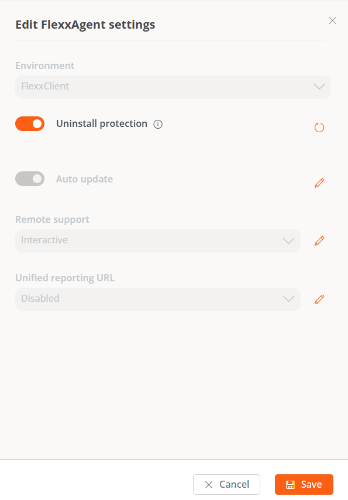
#### Enable protection for a reporting group
1. Go to **Settings** → **Reporting groups**.
2. In the table, choose the reporting group on which you want to run the feature, and in the **Action** field click **Agent settings**.
3. In the form, edit the **Uninstall protection** feature (pencil-shaped button) to choose between enabling or disabling it.
4. Click **Save**.
Reporting groups inherit the configuration made at the Product level; however, they can override it with their own configuration.
## Service architecture
FlexxAgent consists of a Windows service called **FlexxAgent Service**, which coordinates two processes:
* *FlexxAgent*, running at the system level
* *FlexxAgent Analyzer*, started for each user session.
This architecture allows FlexxAgent to manage devices with multiple sessions (such as terminal servers, Citrix, or AVD) and obtain detailed metrics to improve diagnostic capabilities.
#### Example:
* On a laptop, *FlexxAgent* (at the system level) and *FlexxAgent Analyzer* (under the user's identity) are running.
* On a device with multiple sessions, in addition to *FlexxAgent*, one *FlexxAgent Analyzer* process will run per session.
## Resource consumption
FlexxAgent is optimized to minimize resource usage. Approximate values are:
* Disk space: \< 200 MB
* CPU: \< 0.5%
* RAM: 100-200 MB
### FlexxAgent process (system)
* Collection of performance, hardware, session, profile, disk, partition, and Windows service information: **every 60 seconds**.
* Sending of error events from the event log: **every 10 minutes**.
* Update of user profile information: **every 15 minutes**.
### FlexxAgent Analyzer process (user)
* Analyzes application usage, diagnostic data, and user experience.
* Local data collection: **every 15 seconds**.
* Sending of reports to the service: **every 5 minutes** (this metric may change for specific features).
## Supported versions
FlexxAgent is compatible with Windows operating systems currently within Microsoft's support lifecycle. Although it can be installed on unsupported versions:
* Windows 7 SP1
* Windows 8.1 SP1
* Windows Server 2008 R2 SP1
* Windows Server 2012
On these versions, some features may not be available.
## Software requirements
FlexxAgent requires the following components:
* **.NET Framework 4.6.2 or later** (recommended: .NET Framework 4.8).
* **Windows PowerShell 4.0 or later** (PowerShell 5.1 recommended).
* Note: The Azure PowerShell execution policy must be set to *Unrestricted*.
## Considerations for Windows versions in EOL
On systems that are out of support (EOL), FlexxAgent may have limitations or lack compatibility with certain features.
### Unsupported features
When FlexxAgent is used on older Windows operating systems that are out of support, the following features are not supported:
* Collection of GPU consumption metrics.
* Flow execution.
* Execution of microservices by the end user.
* Retrieval of storage drive information.
* For virtual devices, broker and hypervisor detection (limited depending on the vendor).
* User Input Delay (UID) (only available starting with Windows Server 2019 and Windows 10 version 1809).
Broker detection may not work for all of them.
There is no user input delay performance data, as this counter does not exist in Windows 7 or Windows Server 2008 R2.
#### Windows 7 and 2008 R2
FlexxAgent can be installed on Windows 7 x64 or Windows Server 2008 R2 SP1 under the following conditions:
* Install update [KB4474419](https://support.microsoft.com/en-us/topic/sha-2-code-signing-support-update-for-windows-server-2008-r2-windows-7-and-windows-server-2008-september-23-2019-84a8aad5-d8d9-2d5c-6d78-34f9aa5f8339): (*SHA-2 code signing support update for Windows Server 2008 R2, Windows 7, and Windows Server 2008: September 23, 2019*).
* Install update [KB3140245](https://support.microsoft.com/en-us/topic/update-to-enable-tls-1-1-and-tls-1-2-as-default-secure-protocols-in-winhttp-in-windows-c4bd73d2-31d7-761e-0178-11268bb10392): (*Update to enable TLS 1.1 and TLS 1.2 as default secure protocols in WinHTTP in Windows*) and follow the instructions in the *How to enable TLS 1.1 and TLS 1.2 as default secure protocols in WinHTTP in Windows* section of the Microsoft support page.
* Requires at least **.NET Framework 4.6** (recommended: 4.8).
* PowerShell 2.0 with Windows 7 is not compatible with TLS 1.2; install **Windows Management Framework 5.1**, which includes PowerShell 5.1.
#### Windows 8 and 2012
FlexxAgent installation supports Windows 8 under the following conditions:
* Requires **.NET Framework 4.6.2** (Microsoft blocks the installation of later versions on Windows 8.0).
* All Windows security updates must be applied to ensure compatibility with **TLS 1.2** and **SHA-2** code signing.
## Unattended deployment
FlexxAgent supports unattended deployment via GPOs, Intune, SCCM, or other distribution tools.
### Installation
Unattended installation of FlexxAgent is performed via PowerShell.
```
Start-Process "\FlexxAgent-Installer.exe" -ArgumentList "" -WindowStyle Hidden -Wait
```
### Supported parameters
| Parameter | Type | Description |
| ------------------ | --------- | --------------------------------------------------------------------------------------------------- |
| proxyAbsoluteUri | \[string] | Proxy URL and port. |
| proxyUser | \[string] | User for authenticated proxy. |
| proxyPass | \[string] | Password for authenticated proxy. |
| proxyPersistConfig | \[switch] | If specified, the configuration is persisted in the registry. |
| configFilePath | \[string] | Alternative directory for the FlexxAgent-Configuration.conf file. |
| DebugMode | \[switch] | When specified, creates a text file in the same folder with the transcript of the script execution. |
| RepairAgent | \[bool] | Removes the pre-existing FlexxAgent configuration when reinstalling on a device. |
| Help | \[switch] | Lists the supported parameters, with type and description. |
### Uninstallation
To uninstall FlexxAgent unattended:
```
"C:\Program Files\Flexxible\FlexxAgent\VDIServiceUpdater.exe" /Uninstall "C:\Program Files\Flexxible\FlexxAgent\FlexxAgent.exe" /quiet
```
The Windows installer does not remove all files, folders, keys, or registry values created during installation. For a clean system image, you can manually delete:
#### Files
* `C:\Windows\Prefetch\FLEXXAGENT.EXE-XXXXXXXX.pf` – where XXXXXXXX is a string of letters and numbers
* `C:\Windows\Temp\FlexxAgentInstallation.log`
#### Folders
* `C:\Program Files\Flexxible`
* `C:\ProgramData\Flexxible`
### Reinstallation
To reinstall FlexxAgent on a device while removing its previous configuration, run:
```
FlexxAgent-Installer.exe -repairAgent
```
For example:
```
Start-Process "\FlexxAgent-Installer.exe" -ArgumentList "-repairAgent true" -WindowStyle Hidden -Wait
```
## Uninstall protection
This feature prevents a user from uninstalling FlexxAgent. The configuration can be applied at the Product or Reporting group level.
### Requirements
* The configuration can only be done by a user with the *Organization Administrator* role.
* Minimum FlexxAgent version: 25.4.2.
This feature is disabled by default.
### Configuration at the Product level
1. Go to **Settings** → **Organization**.
2. In the menu, select the **Products** tab.
3. In the table, choose the environment on which you want to run the feature, and in the **Action** field click **Agent settings**.
4. In the form, enable or disable the **Uninstall protection** toggle.
5. Click **Save**.
### Configuration at the Reporting groups level
The feature can be run on one or more reporting groups.
#### Enable protection for a reporting group
1. Go to **Settings** → **Reporting groups**.
2. In the table, choose the reporting group on which you want to run the feature, and in the **Action** field click **Agent settings**.
3. In the form, edit the **Uninstall protection** feature (pencil-shaped button) to choose between enabling or disabling it.
4. Click **Save**.
Reporting groups inherit the configuration made at the Product level; however, they can override it with their own configuration.
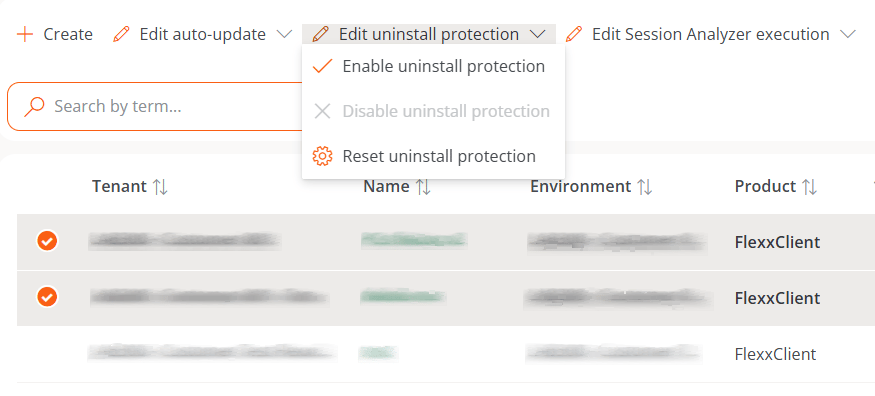
 #### Enable protection for multiple reporting groups
1. Go to **Settings** → **Reporting groups**.
2. In the table, select the reporting groups on which you want to run the feature.
3. Click **Edit uninstall protection**. Three options will be displayed:
* **Enable uninstall protection.** Protects the reporting groups against FlexxAgent uninstallation (this option will not be available if the feature is already enabled at the Product level).
* **Disable uninstall protection.** Allows users to uninstall FlexxAgent (this option will not be available if the feature is already disabled at the Product level).
* **Reset uninstall protection.** Applies the configuration of the Product the reporting group belongs to, whether enabled or disabled.
#### Enable protection for multiple reporting groups
1. Go to **Settings** → **Reporting groups**.
2. In the table, select the reporting groups on which you want to run the feature.
3. Click **Edit uninstall protection**. Three options will be displayed:
* **Enable uninstall protection.** Protects the reporting groups against FlexxAgent uninstallation (this option will not be available if the feature is already enabled at the Product level).
* **Disable uninstall protection.** Allows users to uninstall FlexxAgent (this option will not be available if the feature is already disabled at the Product level).
* **Reset uninstall protection.** Applies the configuration of the Product the reporting group belongs to, whether enabled or disabled.
 A device will have *FlexxAgent uninstall protection* enabled in the following cases:
* The feature is enabled in the reporting group it belongs to.
* The feature is deactivated in the reporting group (neither enabled nor disabled), but is enabled at the Product level.
### Ways to uninstall FlexxAgent with protection enabled
If a user has the feature enabled but needs to uninstall FlexxAgent, they will have two options:
1. Move the device to a reporting group that does not have the protection enabled.
2. Through a token:
* Go to **Workspaces** and select the device.
* Run the **Reveal uninstall token** action, which will display a unique token for that device, valid until 23:59:59 UTC of the following day.
* Go to the Windows Control Panel and uninstall FlexxAgent by entering the token.
A device will have *FlexxAgent uninstall protection* enabled in the following cases:
* The feature is enabled in the reporting group it belongs to.
* The feature is deactivated in the reporting group (neither enabled nor disabled), but is enabled at the Product level.
### Ways to uninstall FlexxAgent with protection enabled
If a user has the feature enabled but needs to uninstall FlexxAgent, they will have two options:
1. Move the device to a reporting group that does not have the protection enabled.
2. Through a token:
* Go to **Workspaces** and select the device.
* Run the **Reveal uninstall token** action, which will display a unique token for that device, valid until 23:59:59 UTC of the following day.
* Go to the Windows Control Panel and uninstall FlexxAgent by entering the token.
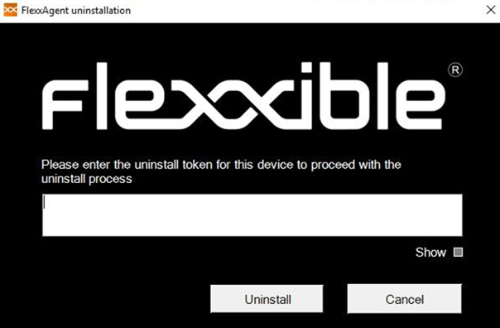 Before managing the uninstallation of FlexxAgent through tools such as Intune or custom scripts, the desired devices must be moved to a reporting group that does not have the protection enabled.
Flexxible recommends having a reporting group with *Uninstall protection* disabled to facilitate FlexxAgent uninstallation tasks on devices.
## Known issues
**FlexxAgent installation**
#### Issue 1 - Windows Management Instrumentation (WMI)
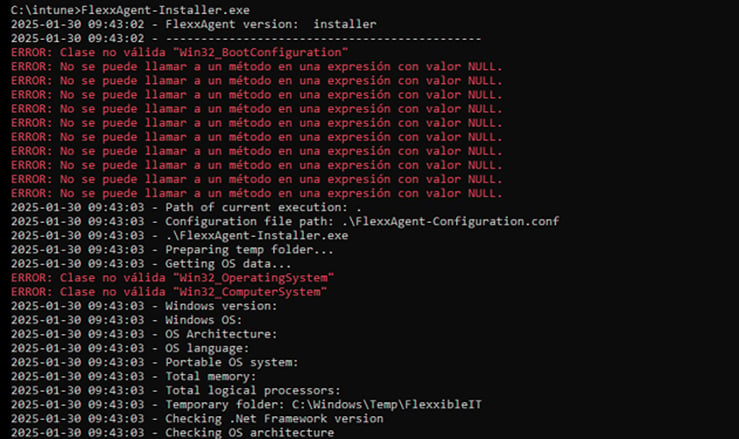
If the device has issues caused by the Windows Management Instrumentation (WMI) service during installation or reinstallation, the process may report these errors in the CMD window:
Before managing the uninstallation of FlexxAgent through tools such as Intune or custom scripts, the desired devices must be moved to a reporting group that does not have the protection enabled.
Flexxible recommends having a reporting group with *Uninstall protection* disabled to facilitate FlexxAgent uninstallation tasks on devices.
## Known issues
**FlexxAgent installation**
#### Issue 1 - Windows Management Instrumentation (WMI)
If the device has issues caused by the Windows Management Instrumentation (WMI) service during installation or reinstallation, the process may report these errors in the CMD window:
 #### Solution
Run the following commands:
```
Stop-Service winmgmt -Force
```
```
winmgmt /resetrepository
```
```
Start-Service winmgmt
```
#### Issue 2 - PowerShell process restriction
Some security solutions do not allow the installation and/or auto-update of FlexxAgent to complete successfully. The installer may return the message:
*The process was terminated with errors. A corrupted installation was detected due to external processes. This is usually caused by antivirus activity. Please check your antivirus settings.*
#### Solution
Exclude the following files:
`C:\Windows\Temp\FlexxibleIT`
`C:\Windows\Temp\UpdateFlexxAgent.ps1`
***
**FlexxAgent uninstallation**
#### Issue - FlexxAgent remains in the services list
It may happen that FlexxAgent still appears in the services list even though it has been uninstalled and all files have been deleted. This would prevent it from being reinstalled.
#### Solution
Run the following command as administrator in the CMD window:
```
sc delete "FlexxAgent service"
```
Then, restart the device.
## Proxy configuration
FlexxAgent supports proxies configured transparently at the system level, with or without authentication. The proxy configuration can be done via the command line or by modifying registry keys.
### Proxy configuration via command line
Installation with parameters:
```
FlexxAgent-Installer.exe -proxyAbsoluteUri ip.ad.dre.ss:port -proxyPersistConfig:$True
```
Where `ip.ad.dre.ss:port` corresponds to the proxy's IP or DNS and port.
Or including credentials:
```
FlexxAgent-Installer.exe -proxyAbsoluteUri ip.ad.dre.ss:port -proxyUser ProxyUserName -proxyPass ProxyUserPassword -proxyPersistConfig:$True
```
FlexxAgent may not have access to the proxy applied in its configuration if it is outside the corporate network. To determine its accessibility, FlexxAgent attempts to resolve the DNS record and makes a TCP request to the corresponding port. If the proxy is not accessible, FlexxAgent will report directly (without a proxy).
### Proxy configuration via registry keys
The registry keys that store the proxy configuration are located at:
`Equipo\HKEY_LOCAL_MACHINE\SOFTWARE\Policies\Flexxible\FlexxAgent\Communications`
Registry keys related to the proxy configuration:
* Proxy\_URL key
* Proxy\_User key
* Proxy\_Pwd key
#### Proxy\_URL key
* Path: `HKEY_LOCAL_MACHINE\SOFTWARE\Policies\Flexxible\FlexxAgent\Communications`
* Name: Proxy\_URL
* Type: REG\_SZ
* Supported values: the URL and port; for example `http://192.168.1.1:3128` or `https://192.168.1.1:3128`
#### Proxy\_User key
* Path: `HKEY_LOCAL_MACHINE\SOFTWARE\Policies\Flexxible\FlexxAgent\Communications`
* Name: Proxy\_User
* Type: REG\_SZ
* Supported values: the user name to authenticate against the proxy; for example `Administrador`. Can be omitted for unauthenticated proxies.
#### Proxy\_Pwd key
* Path: `HKEY_LOCAL_MACHINE\SOFTWARE\Policies\Flexxible\FlexxAgent\Communications`
* Name: Proxy\_Pwd
* Type: REG\_SZ
* Supported values: the password to authenticate against the proxy. Can be omitted for unauthenticated proxies.
The value of the Proxy\_Pwd key can be set in plain text (not recommended) or encoded in base64 and enclosed in "&&&".
For example: `&&&VGhpc0lzTjArQCQzY3VyZVBAJCR3MHJk&&&` for the "Proxy\_Pwd" value.
In either case, FlexxAgent encrypts the value as soon as it starts or attempts to transmit information.
You can generate a Base64-encoded string from [https://www.base64encode.org/](https://www.base64encode.org/).
Since FlexxAgent triggers one process at the system level (*FlexxAgent.exe*) and another at the session level (*FlexxAgent Analyzer.exe*), it may be necessary to define different proxy types for each one, depending on how the proxy behaves at each level.
The **Proxy type** can be defined from the FlexxAgent Settings, under `Products`.
## Logs
Logs provide information and allow you to diagnose issues during installation.
* Installation and update logs
* FlexxAgent Analyzer logs
* FlexxAgent service logs
### Installation and update logs
Location:
`C:\Windows\Temp\Flexxible`
Contains information about the installation or update process, dependencies, and process details.
### FlexxAgent Analyzer logs
Location:
`%LOCALAPPDATA%\FAAgent\Logs`
They can be configured to include or exclude information by criticality level.
### FlexxAgent service logs
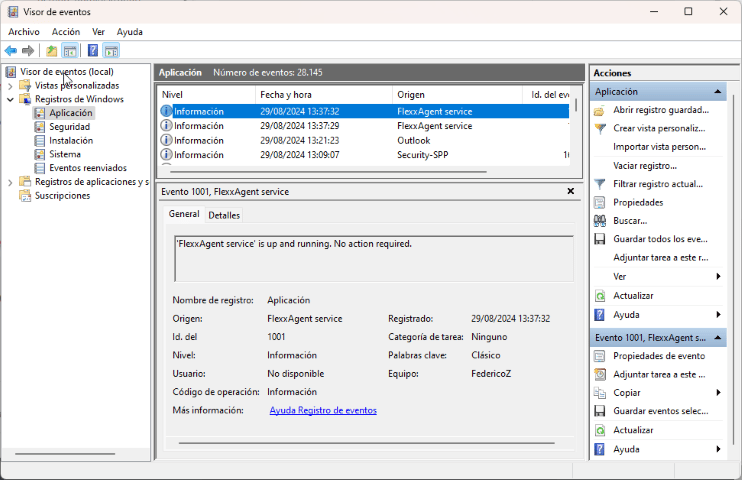
Available in the **Windows Event Viewer**, under the **Application** branch.
#### Solution
Run the following commands:
```
Stop-Service winmgmt -Force
```
```
winmgmt /resetrepository
```
```
Start-Service winmgmt
```
#### Issue 2 - PowerShell process restriction
Some security solutions do not allow the installation and/or auto-update of FlexxAgent to complete successfully. The installer may return the message:
*The process was terminated with errors. A corrupted installation was detected due to external processes. This is usually caused by antivirus activity. Please check your antivirus settings.*
#### Solution
Exclude the following files:
`C:\Windows\Temp\FlexxibleIT`
`C:\Windows\Temp\UpdateFlexxAgent.ps1`
***
**FlexxAgent uninstallation**
#### Issue - FlexxAgent remains in the services list
It may happen that FlexxAgent still appears in the services list even though it has been uninstalled and all files have been deleted. This would prevent it from being reinstalled.
#### Solution
Run the following command as administrator in the CMD window:
```
sc delete "FlexxAgent service"
```
Then, restart the device.
## Proxy configuration
FlexxAgent supports proxies configured transparently at the system level, with or without authentication. The proxy configuration can be done via the command line or by modifying registry keys.
### Proxy configuration via command line
Installation with parameters:
```
FlexxAgent-Installer.exe -proxyAbsoluteUri ip.ad.dre.ss:port -proxyPersistConfig:$True
```
Where `ip.ad.dre.ss:port` corresponds to the proxy's IP or DNS and port.
Or including credentials:
```
FlexxAgent-Installer.exe -proxyAbsoluteUri ip.ad.dre.ss:port -proxyUser ProxyUserName -proxyPass ProxyUserPassword -proxyPersistConfig:$True
```
FlexxAgent may not have access to the proxy applied in its configuration if it is outside the corporate network. To determine its accessibility, FlexxAgent attempts to resolve the DNS record and makes a TCP request to the corresponding port. If the proxy is not accessible, FlexxAgent will report directly (without a proxy).
### Proxy configuration via registry keys
The registry keys that store the proxy configuration are located at:
`Equipo\HKEY_LOCAL_MACHINE\SOFTWARE\Policies\Flexxible\FlexxAgent\Communications`
Registry keys related to the proxy configuration:
* Proxy\_URL key
* Proxy\_User key
* Proxy\_Pwd key
#### Proxy\_URL key
* Path: `HKEY_LOCAL_MACHINE\SOFTWARE\Policies\Flexxible\FlexxAgent\Communications`
* Name: Proxy\_URL
* Type: REG\_SZ
* Supported values: the URL and port; for example `http://192.168.1.1:3128` or `https://192.168.1.1:3128`
#### Proxy\_User key
* Path: `HKEY_LOCAL_MACHINE\SOFTWARE\Policies\Flexxible\FlexxAgent\Communications`
* Name: Proxy\_User
* Type: REG\_SZ
* Supported values: the user name to authenticate against the proxy; for example `Administrador`. Can be omitted for unauthenticated proxies.
#### Proxy\_Pwd key
* Path: `HKEY_LOCAL_MACHINE\SOFTWARE\Policies\Flexxible\FlexxAgent\Communications`
* Name: Proxy\_Pwd
* Type: REG\_SZ
* Supported values: the password to authenticate against the proxy. Can be omitted for unauthenticated proxies.
The value of the Proxy\_Pwd key can be set in plain text (not recommended) or encoded in base64 and enclosed in "&&&".
For example: `&&&VGhpc0lzTjArQCQzY3VyZVBAJCR3MHJk&&&` for the "Proxy\_Pwd" value.
In either case, FlexxAgent encrypts the value as soon as it starts or attempts to transmit information.
You can generate a Base64-encoded string from [https://www.base64encode.org/](https://www.base64encode.org/).
Since FlexxAgent triggers one process at the system level (*FlexxAgent.exe*) and another at the session level (*FlexxAgent Analyzer.exe*), it may be necessary to define different proxy types for each one, depending on how the proxy behaves at each level.
The **Proxy type** can be defined from the FlexxAgent Settings, under `Products`.
## Logs
Logs provide information and allow you to diagnose issues during installation.
* Installation and update logs
* FlexxAgent Analyzer logs
* FlexxAgent service logs
### Installation and update logs
Location:
`C:\Windows\Temp\Flexxible`
Contains information about the installation or update process, dependencies, and process details.
### FlexxAgent Analyzer logs
Location:
`%LOCALAPPDATA%\FAAgent\Logs`
They can be configured to include or exclude information by criticality level.
### FlexxAgent service logs
Available in the **Windows Event Viewer**, under the **Application** branch.
 ## FlexxAgent Health Status
The FlexxAgent Health Status process runs periodically (every hour) to evaluate whether FlexxAgent is working correctly. To do so, it checks its *heartbeat* and analyzes various internal metrics that determine whether it is operating properly or whether a recovery process needs to be started.
During this evaluation, external factors that may affect the agent's communication are not taken into account, such as:
* The device's connectivity at that moment (it may or may not have a WiFi or Ethernet connection).
* Interference from a firewall or proxy in the communication.
On the other hand, the following aspects are considered:
* That the service is started.
* That the service is not disabled; if it is, it is understood that an administrator decided to take that action.
### Verifying the FlexxAgent self-repair process
FlexxAgent leaves a trace in the event log with the following entries:
* **Source**: FlexxAgent Service
* **Log name**: Application
> - Event 1001 Checking FlexxAgent health / `` is up and running. No action required
> - Event 1002 Disabled service. No action required / Backup not found. `` not recoverable
> - Event 1003 Service `` restored from previous backup / Error `` found when starting `` with restored backup
> - Event 1004 Service failed to start and will be repaired
> - Event 1005 Service did not report for a long time and will be repaired
> - Event 1006 Service was started
> - Event 1007 Error found when restarting service after not reporting for a long time
## Information obtained from the device
FlexxAgent collects data locally from the device and sends it to the service consoles.
### General information
* **Name.** Name of the device.
* **Device status.** Power status of the device. It can be *Powered on*, *Powered off*, or *Not reporting*.
* **Summarized status.** If the device status is *Powered off*, it can indicate whether it is *In maintenance* or just *Powered off*. If the device status is *Not reporting*, it can indicate whether the reason is *Unknown*.
* **FlexxAgent version.** Version number of FlexxAgent installed on the device.
* **FlexxAgent status.** *Running* or *Stopped*.
* **Last FlexxAgent report.** Date and time of the last FlexxAgent report on the device. This date may not be recent if the FlexxAgent service is stopped or the device is powered off.
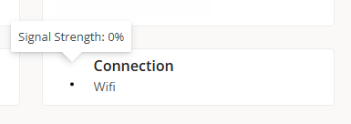
* **Connection type.** Indicates whether the device is connected via *Wireless LAN*, *Mobile network*, *Ethernet*, or *Unknown*.
When the connection is made over a wireless LAN network, a message may appear indicating that the device has a 0% signal or that FlexxAgent is not sending reports. This occurs because the Windows location service is disabled on the device. Please check this [link](https://support.microsoft.com/en-us/windows/windows-location-service-and-privacy-3a8eee0a-5b0b-dc07-eede-2a5ca1c49088#:~:text=How%20to%20control%20location%20settings,%3E%20Settings%20%3E%20Privacy%20%3E%20Location) to learn how to enable it.
## FlexxAgent Health Status
The FlexxAgent Health Status process runs periodically (every hour) to evaluate whether FlexxAgent is working correctly. To do so, it checks its *heartbeat* and analyzes various internal metrics that determine whether it is operating properly or whether a recovery process needs to be started.
During this evaluation, external factors that may affect the agent's communication are not taken into account, such as:
* The device's connectivity at that moment (it may or may not have a WiFi or Ethernet connection).
* Interference from a firewall or proxy in the communication.
On the other hand, the following aspects are considered:
* That the service is started.
* That the service is not disabled; if it is, it is understood that an administrator decided to take that action.
### Verifying the FlexxAgent self-repair process
FlexxAgent leaves a trace in the event log with the following entries:
* **Source**: FlexxAgent Service
* **Log name**: Application
> - Event 1001 Checking FlexxAgent health / `` is up and running. No action required
> - Event 1002 Disabled service. No action required / Backup not found. `` not recoverable
> - Event 1003 Service `` restored from previous backup / Error `` found when starting `` with restored backup
> - Event 1004 Service failed to start and will be repaired
> - Event 1005 Service did not report for a long time and will be repaired
> - Event 1006 Service was started
> - Event 1007 Error found when restarting service after not reporting for a long time
## Information obtained from the device
FlexxAgent collects data locally from the device and sends it to the service consoles.
### General information
* **Name.** Name of the device.
* **Device status.** Power status of the device. It can be *Powered on*, *Powered off*, or *Not reporting*.
* **Summarized status.** If the device status is *Powered off*, it can indicate whether it is *In maintenance* or just *Powered off*. If the device status is *Not reporting*, it can indicate whether the reason is *Unknown*.
* **FlexxAgent version.** Version number of FlexxAgent installed on the device.
* **FlexxAgent status.** *Running* or *Stopped*.
* **Last FlexxAgent report.** Date and time of the last FlexxAgent report on the device. This date may not be recent if the FlexxAgent service is stopped or the device is powered off.
* **Connection type.** Indicates whether the device is connected via *Wireless LAN*, *Mobile network*, *Ethernet*, or *Unknown*.
When the connection is made over a wireless LAN network, a message may appear indicating that the device has a 0% signal or that FlexxAgent is not sending reports. This occurs because the Windows location service is disabled on the device. Please check this [link](https://support.microsoft.com/en-us/windows/windows-location-service-and-privacy-3a8eee0a-5b0b-dc07-eede-2a5ca1c49088#:~:text=How%20to%20control%20location%20settings,%3E%20Settings%20%3E%20Privacy%20%3E%20Location) to learn how to enable it.
 * **Network.** Addressing of the device's network and public IP for Internet egress. These networks are created automatically when more than four devices are connected to the same network.
* **Subnet.** Addressing of the device's network.
* **MAC address.** Unique identifier of the device's network card.
* **Network changed.** Date and time of the last time the network changed.
* **Sessions.** Number of user sessions established on the device.
* **Last user.** Last user connected to the device, in domain\account format.
* **Connected from.** When the selected device is a VDI or similar, shows the name of the device from which the virtual device is accessed.
* **Connection time.** Date and time when the session started.
* **Domain.** Domain the device belongs to.
* **Code.** Lets you identify the device with a custom code. This code must be assigned manually and individually using the **Edit** option in the **Operations** menu of the device detail.
* **OU.** Organizational unit of the domain where the device's account resides.
* **Description.** Lets the user identify the device with a custom description. This field must be assigned manually and individually using the **Edit** option in the **Operations** menu of the device detail.
### Extended information
* **RAM.** Total amount of available RAM.
* **Cores.** Number of processor cores.
* **IP address.** IP address of the device on the local network.
* **OS.** Type of operating system.
* **Operating system.** Version of the operating system.
* **OS build.** Build number of the operating system.
* **Uptime.** Time the device has been running since the last time it was started or restarted. If fast startup (*fastboot*) is enabled, the device is only powered off when it is restarted.
* **Downtime.** Indicates the time elapsed since the last input event was received in the FlexxAgent user session. Shows 0 if the user is effectively using any input device connected to the device.
* **Last Windows update.** Date when updates were last applied on the device.
* **Last boot duration.** Duration of the boot process of the last startup.
* **Pending restart.** Shows whether the device requires a restart due to updates.
* **Windows type.** Type of Windows operating system: *Client* or *Server*.
* **System disk.** Amount of free disk space relative to the total capacity.
* **ISP public IP.** The ISP is obtained using the public IP. It may not be accurate if connected to a corporate network or using a VPN.
* **Region.** Obtained using the public IP. It may not be accurate if connected to a corporate network or using a VPN.
* **Broker type.** If detected, shows the session broker used.
* **Hypervisor.** If virtualization is detected, shows the hypervisor used.
* **Delivery group.** For VDIs, shows the delivery group the device belongs to.
* **Subscription / Broker.** Microsoft Azure or Citrix service that manages user connections to the device.
* **Registration status.** Indicates the registration status of the virtual device.
* **Maintenance mode.** Indicates whether the virtual device's maintenance mode is *On* or *Off*.
* **Virtual machine type.** Indicates the type of virtual device.
* **Session Analyzer.** Indicates whether or not it is configured to start Session Analyzer in all user sessions.
* **Session Analyzer version.** Version number of Session Analyzer.
* **Reporting group.** Reporting group the device belongs to.
* **BIOS manufacturer.** Name of the manufacturer of the device's firmware.
* **BIOS version.** Version of the device's firmware.
* **SMBIOS version.** Version of the device's System Management BIOS.
* **BIOS serial number.** Unique number assigned to the device by its manufacturer. Available only if the manufacturer decided the device needed one.
* **Google Chrome version.** Build number of Google Chrome, if installed.
* **Microsoft Edge version.** Build number of Microsoft Edge, if installed.
### Additional information
FlexxAgent groups information about the following aspects of the device:
#### Sessions
Shows a table with the record of user sessions established on the device and specific information about the session type, connection status, or start date.
#### Performance
Presents charts of the device's main performance counters, based on data collected during the last two hours. The following are included:
* **CPU.** Processor usage percentage
* **Memory.** Amount of memory used and available
* **Bandwidth usage.** Amount of inbound and outbound traffic
* **UID.** User input delay. Refers to the time span between the moment a user performs an action, such as clicking a mouse button or pressing a key, and the moment the corresponding response is displayed on the screen or executed.
* **Connection signal.** Signal reception percentage when the device connects via a wireless method.
At the top, a link provides access to the Analyzer module.
#### Jobs
All actions performed from the Workspaces module on one or more devices are audited in the `Jobs` queue. This tab lets you consult the jobs performed for the active device.
#### Alerts
Presents a table with the list of all active alerts on the device. When an alert is recorded, a notice is shown at the top of the page.
#### Event log
Information about the events present on the device. By default, errors are filtered and only those with a severity level of *Error* or *Critical* are shown. FlexxAgent obtains this information at 10-minute intervals.
Through the options available in the settings, you can modify the sampling time or include events by their ID.
#### Connection log
Presents a list of the connections established with the device, including each instance in which a user signs in or reconnects a previously disconnected session.
The session end date is recorded only for sessions that have been disconnected or closed. As long as the session remains active, this field will remain empty.
#### Windows services
This option shows the status of services and lets you run start, restart, or stop operations on Windows services.
#### Disks
Shows a list of all the partitions present on the disks identified in the system, as well as statistics on their capacity and occupancy levels.
#### Boot history
Presents a chart showing the duration of the device's last ten boots.
#### Notifications
Lets you see whether the device has any active notifications. When there is one, a message is shown at the top of the page.
#### Security
From this section you can consult information about the installed antivirus, as well as charts on RAM and CPU consumption.
* **Antivirus.** Name of the antivirus solution installed or integrated in the system. If more than one is detected, *Multiple* is indicated.
* **Antivirus version.** Installed version number.
* **Antivirus status.** Operational status of the solution.
Antivirus detection is automatic only on the Windows Client operating system (Windows 7 or later). On Windows Server, only Bitdefender and Windows Defender will be detected, and these will be the only ones to show RAM and CPU usage.
If FlexxAgent detects CrowdStrike as the Endpoint Detection and Response (EDR) solution, the same information fields will be displayed:
* **Endpoint Detection and Response (EDR).** Name of the endpoint security solution; in this case CrowdStrike.
* **CrowdStrike version.** Installed version number.
* **CrowdStrike status.** Operational status of the solution.
FlexxAgent syncs CrowdStrike alerts every minute.
If, in addition, the CrowdStrike integration has been set up from the Portal, a table will be shown with information about the detections, which will include the following fields:
* **Severity.** Criticality level assigned to the detection based on the potential impact or risk of the threat.
* **Created.** Date and time when the detection was generated in the system.
* **User name.** User associated with the activity or process that triggered the detection.
* **Status.** Current status of the detection.
* **Display name.** Descriptive name assigned to the detection, which summarizes the type of threat or behavior identified.
* **Description.** Expanded information about the detection.
* **Command line.** Command or instruction executed on the device that generated or is related to the detection.
#### Compliance
Lets you see the status of the compliance policy configured for the active device. To update this field on demand, click **Operations** → **Force compliance**.
#### Group Policy (GPO)
Shows information about the group policies applied on the active device. Lets you see the policy names as well as the check time.
#### PnP devices
Shows the Plug and Play (PnP) devices that are in an error state, which may be due to hardware failures or an incorrect configuration of the driver or the device itself.
At the bottom of this view, a table records all events related to PnP devices, generating an entry each time a peripheral is connected or disconnected.
#### System summary
Presents system information for Windows devices. Includes:
| Field | Detail |
| ------------------------- | ---------------------------------------------------------------------------------------------------------------------------------------------------------------------------- |
| OSVersion | Version number of the operating system |
| OtherOSDescription | Additional description of the current version of the operating system (optional) |
| OSManufacturer | Name of the operating system manufacturer. For Windows-based systems, this value is "Microsoft Corporation" |
| SystemModel | Product name that a manufacturer gives to a computer |
| SystemType | System running on the Windows-based computer |
| SystemSKU | Product stock-keeping unit (SKU) information of the product (optional) |
| Processor | Name, number of cores, and number of logical processors of the processor |
| BIOSReleaseDate | UTC release date of the Windows BIOS |
| EmbeddedControllerVersion | Major and minor versions of the embedded controller firmware, separated by "." |
| BaseBoardManufacturer | Name of the organization responsible for manufacturing the physical device |
| BaseBoardProduct | Baseboard part number defined by the manufacturer |
| BaseBoardVersion | Version of the physical device |
| PlatformRole | Chassis type where Unspecified = 0, Desktop = 1, Mobile = 2, Workstation = 3, EnterpriseServer = 4, SOHOServer = 5, AppliancePC = 6, PerformanceServer = 7, MaximumValue = 8 |
| WindowsDirectory | Windows directory of the operating system |
| SystemDirectory | System directory of the operating system |
| BootDevice | Name of the disk drive from which the Windows operating system boots |
| Locale | Language identifier name used by the operating system |
| TimeZone | Name of the operating system's time zone |
| PageFileSpace | Actual amount of disk space allocated for use as a paging file, in megabytes |
| PageFile | Name of the paging file |
| BIOSMode | Boot mode of the device (BIOS or UEFI) |
| SecureBootState | Secure Boot mode status (Off, On) |
#### Reporting group history
Lets you see which reporting groups the device belongs to, the date it joined, and whether the group was assigned manually or automatically.
* **Network.** Addressing of the device's network and public IP for Internet egress. These networks are created automatically when more than four devices are connected to the same network.
* **Subnet.** Addressing of the device's network.
* **MAC address.** Unique identifier of the device's network card.
* **Network changed.** Date and time of the last time the network changed.
* **Sessions.** Number of user sessions established on the device.
* **Last user.** Last user connected to the device, in domain\account format.
* **Connected from.** When the selected device is a VDI or similar, shows the name of the device from which the virtual device is accessed.
* **Connection time.** Date and time when the session started.
* **Domain.** Domain the device belongs to.
* **Code.** Lets you identify the device with a custom code. This code must be assigned manually and individually using the **Edit** option in the **Operations** menu of the device detail.
* **OU.** Organizational unit of the domain where the device's account resides.
* **Description.** Lets the user identify the device with a custom description. This field must be assigned manually and individually using the **Edit** option in the **Operations** menu of the device detail.
### Extended information
* **RAM.** Total amount of available RAM.
* **Cores.** Number of processor cores.
* **IP address.** IP address of the device on the local network.
* **OS.** Type of operating system.
* **Operating system.** Version of the operating system.
* **OS build.** Build number of the operating system.
* **Uptime.** Time the device has been running since the last time it was started or restarted. If fast startup (*fastboot*) is enabled, the device is only powered off when it is restarted.
* **Downtime.** Indicates the time elapsed since the last input event was received in the FlexxAgent user session. Shows 0 if the user is effectively using any input device connected to the device.
* **Last Windows update.** Date when updates were last applied on the device.
* **Last boot duration.** Duration of the boot process of the last startup.
* **Pending restart.** Shows whether the device requires a restart due to updates.
* **Windows type.** Type of Windows operating system: *Client* or *Server*.
* **System disk.** Amount of free disk space relative to the total capacity.
* **ISP public IP.** The ISP is obtained using the public IP. It may not be accurate if connected to a corporate network or using a VPN.
* **Region.** Obtained using the public IP. It may not be accurate if connected to a corporate network or using a VPN.
* **Broker type.** If detected, shows the session broker used.
* **Hypervisor.** If virtualization is detected, shows the hypervisor used.
* **Delivery group.** For VDIs, shows the delivery group the device belongs to.
* **Subscription / Broker.** Microsoft Azure or Citrix service that manages user connections to the device.
* **Registration status.** Indicates the registration status of the virtual device.
* **Maintenance mode.** Indicates whether the virtual device's maintenance mode is *On* or *Off*.
* **Virtual machine type.** Indicates the type of virtual device.
* **Session Analyzer.** Indicates whether or not it is configured to start Session Analyzer in all user sessions.
* **Session Analyzer version.** Version number of Session Analyzer.
* **Reporting group.** Reporting group the device belongs to.
* **BIOS manufacturer.** Name of the manufacturer of the device's firmware.
* **BIOS version.** Version of the device's firmware.
* **SMBIOS version.** Version of the device's System Management BIOS.
* **BIOS serial number.** Unique number assigned to the device by its manufacturer. Available only if the manufacturer decided the device needed one.
* **Google Chrome version.** Build number of Google Chrome, if installed.
* **Microsoft Edge version.** Build number of Microsoft Edge, if installed.
### Additional information
FlexxAgent groups information about the following aspects of the device:
#### Sessions
Shows a table with the record of user sessions established on the device and specific information about the session type, connection status, or start date.
#### Performance
Presents charts of the device's main performance counters, based on data collected during the last two hours. The following are included:
* **CPU.** Processor usage percentage
* **Memory.** Amount of memory used and available
* **Bandwidth usage.** Amount of inbound and outbound traffic
* **UID.** User input delay. Refers to the time span between the moment a user performs an action, such as clicking a mouse button or pressing a key, and the moment the corresponding response is displayed on the screen or executed.
* **Connection signal.** Signal reception percentage when the device connects via a wireless method.
At the top, a link provides access to the Analyzer module.
#### Jobs
All actions performed from the Workspaces module on one or more devices are audited in the `Jobs` queue. This tab lets you consult the jobs performed for the active device.
#### Alerts
Presents a table with the list of all active alerts on the device. When an alert is recorded, a notice is shown at the top of the page.
#### Event log
Information about the events present on the device. By default, errors are filtered and only those with a severity level of *Error* or *Critical* are shown. FlexxAgent obtains this information at 10-minute intervals.
Through the options available in the settings, you can modify the sampling time or include events by their ID.
#### Connection log
Presents a list of the connections established with the device, including each instance in which a user signs in or reconnects a previously disconnected session.
The session end date is recorded only for sessions that have been disconnected or closed. As long as the session remains active, this field will remain empty.
#### Windows services
This option shows the status of services and lets you run start, restart, or stop operations on Windows services.
#### Disks
Shows a list of all the partitions present on the disks identified in the system, as well as statistics on their capacity and occupancy levels.
#### Boot history
Presents a chart showing the duration of the device's last ten boots.
#### Notifications
Lets you see whether the device has any active notifications. When there is one, a message is shown at the top of the page.
#### Security
From this section you can consult information about the installed antivirus, as well as charts on RAM and CPU consumption.
* **Antivirus.** Name of the antivirus solution installed or integrated in the system. If more than one is detected, *Multiple* is indicated.
* **Antivirus version.** Installed version number.
* **Antivirus status.** Operational status of the solution.
Antivirus detection is automatic only on the Windows Client operating system (Windows 7 or later). On Windows Server, only Bitdefender and Windows Defender will be detected, and these will be the only ones to show RAM and CPU usage.
If FlexxAgent detects CrowdStrike as the Endpoint Detection and Response (EDR) solution, the same information fields will be displayed:
* **Endpoint Detection and Response (EDR).** Name of the endpoint security solution; in this case CrowdStrike.
* **CrowdStrike version.** Installed version number.
* **CrowdStrike status.** Operational status of the solution.
FlexxAgent syncs CrowdStrike alerts every minute.
If, in addition, the CrowdStrike integration has been set up from the Portal, a table will be shown with information about the detections, which will include the following fields:
* **Severity.** Criticality level assigned to the detection based on the potential impact or risk of the threat.
* **Created.** Date and time when the detection was generated in the system.
* **User name.** User associated with the activity or process that triggered the detection.
* **Status.** Current status of the detection.
* **Display name.** Descriptive name assigned to the detection, which summarizes the type of threat or behavior identified.
* **Description.** Expanded information about the detection.
* **Command line.** Command or instruction executed on the device that generated or is related to the detection.
#### Compliance
Lets you see the status of the compliance policy configured for the active device. To update this field on demand, click **Operations** → **Force compliance**.
#### Group Policy (GPO)
Shows information about the group policies applied on the active device. Lets you see the policy names as well as the check time.
#### PnP devices
Shows the Plug and Play (PnP) devices that are in an error state, which may be due to hardware failures or an incorrect configuration of the driver or the device itself.
At the bottom of this view, a table records all events related to PnP devices, generating an entry each time a peripheral is connected or disconnected.
#### System summary
Presents system information for Windows devices. Includes:
| Field | Detail |
| ------------------------- | ---------------------------------------------------------------------------------------------------------------------------------------------------------------------------- |
| OSVersion | Version number of the operating system |
| OtherOSDescription | Additional description of the current version of the operating system (optional) |
| OSManufacturer | Name of the operating system manufacturer. For Windows-based systems, this value is "Microsoft Corporation" |
| SystemModel | Product name that a manufacturer gives to a computer |
| SystemType | System running on the Windows-based computer |
| SystemSKU | Product stock-keeping unit (SKU) information of the product (optional) |
| Processor | Name, number of cores, and number of logical processors of the processor |
| BIOSReleaseDate | UTC release date of the Windows BIOS |
| EmbeddedControllerVersion | Major and minor versions of the embedded controller firmware, separated by "." |
| BaseBoardManufacturer | Name of the organization responsible for manufacturing the physical device |
| BaseBoardProduct | Baseboard part number defined by the manufacturer |
| BaseBoardVersion | Version of the physical device |
| PlatformRole | Chassis type where Unspecified = 0, Desktop = 1, Mobile = 2, Workstation = 3, EnterpriseServer = 4, SOHOServer = 5, AppliancePC = 6, PerformanceServer = 7, MaximumValue = 8 |
| WindowsDirectory | Windows directory of the operating system |
| SystemDirectory | System directory of the operating system |
| BootDevice | Name of the disk drive from which the Windows operating system boots |
| Locale | Language identifier name used by the operating system |
| TimeZone | Name of the operating system's time zone |
| PageFileSpace | Actual amount of disk space allocated for use as a paging file, in megabytes |
| PageFile | Name of the paging file |
| BIOSMode | Boot mode of the device (BIOS or UEFI) |
| SecureBootState | Secure Boot mode status (Off, On) |
#### Reporting group history
Lets you see which reporting groups the device belongs to, the date it joined, and whether the group was assigned manually or automatically.