> ## Documentation Index
> Fetch the complete documentation index at: https://docs.flexxible.com/llms.txt
> Use this file to discover all available pages before exploring further.
# Session detail
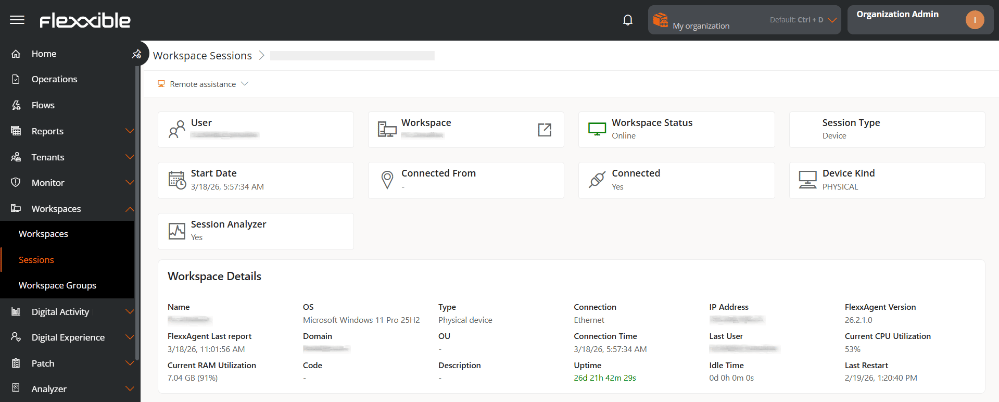
By clicking on a user's name in the sessions table, you access their detail view. From here you can:
* Run remote assistance
* View session information.
### Session information
* **User.** Username in `domain\user` format.
* **Workspace.** Name of the device where the session was started. It is clickable and redirects to the Workspaces view.
* **Workspace state.** State of the device.
* **Session type.** Indicates the type of session: *Application*, *Device*, *SDI Desktop*, or *VDI Desktop*.
* **Start date.** Date and time the session started.
* **Connected from.** Source device from which the session was started. It may appear empty if the session is started locally.
* **Connected.** Indicates whether the session is active or disconnected.
* **Device type.** Indicates whether the device is physical or virtual.
* **Session Analyzer.** Indicates whether Session Analyzer is currently running on the device's session.
 ### Workspace details
This section shows technical information about the device associated with the session:
* **Name.** Name of the device.
* **OS.** Installed operating system.
* **Type.** Type of device: *Physical* or *Virtual*.
* **Connection.** Type of active network connection.
* **IP address.** IP address assigned in the network.
* **FlexxAgent version.** Installed version of the agent.
* **FlexxAgent last report.** Date and time of the last report sent.
* **Domain.** Domain to which the device belongs.
* **OU.** Organizational unit within the domain.
* **Connection time.** Duration of the current session or time elapsed since the last connection.
* **Last user.** Last user who signed in to the device.
* **Current CPU usage.** CPU usage percentage in real time.
* **Current RAM usage.** RAM memory usage percentage in real time.
* **Code.** Unique identifier of the device.
* **Description.** Additional or descriptive information about the device.
* **Uptime.** Time the device has been on since the last restart.
* **Inactive time.** Time in which the device has been powered off or disconnected.
* **Last restart.** Date and time of the last system restart.
### Flexxible Assist
Flexxible Assist is a feature designed to facilitate secure and efficient technical support, allowing an operator to remotely access a device and take control of the user's session to diagnose issues, apply changes, or execute administrative tasks.
#### Perform remote assistance
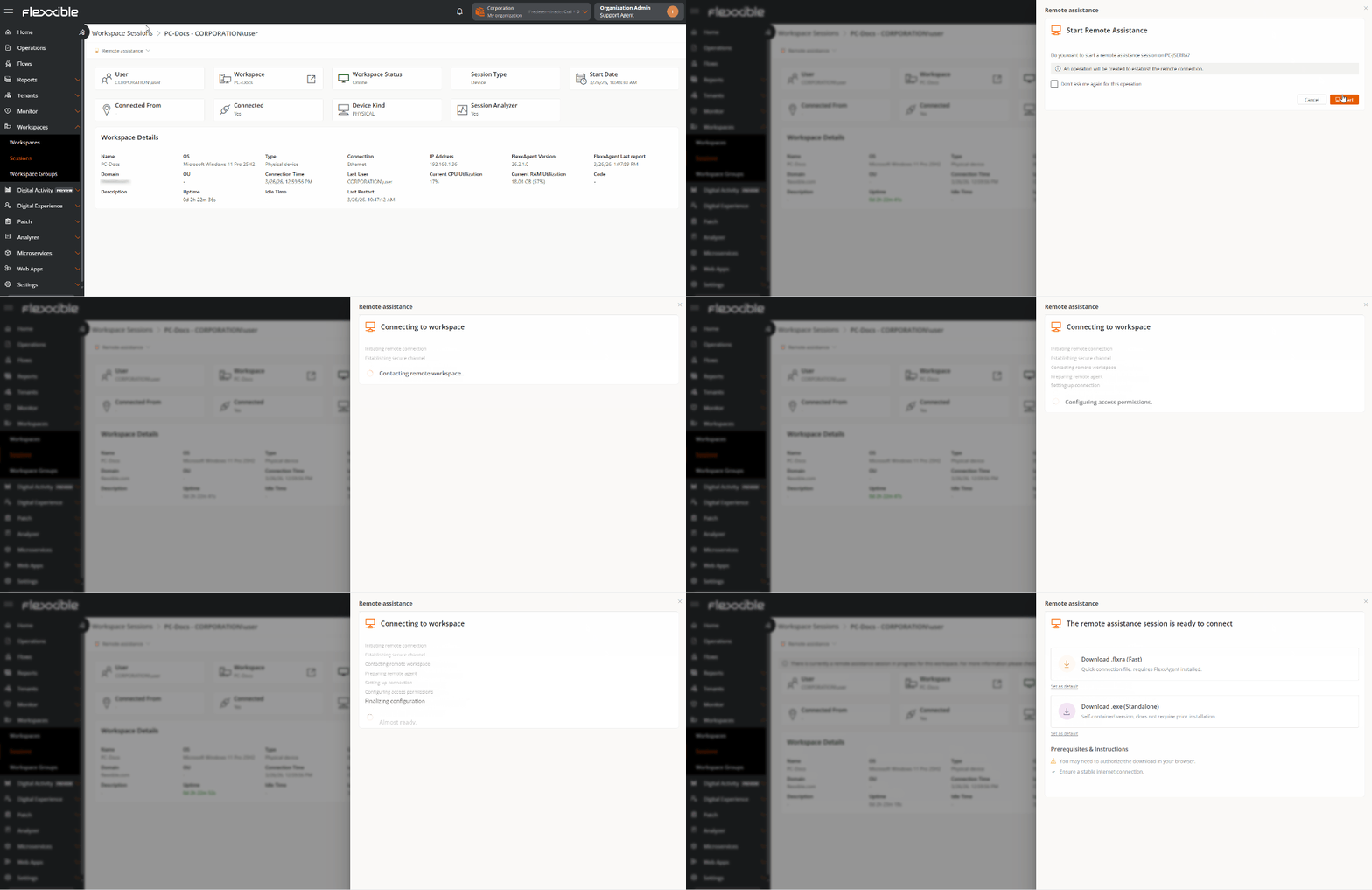
1. Go to **Workspaces** → **Sessions**.
2. In the table, select the session on which you want to perform assistance.
3. Click the **Remote Assistance** button.
4. Select the type of assistance.
5. Wait a few seconds and download the activation file.
### Workspace details
This section shows technical information about the device associated with the session:
* **Name.** Name of the device.
* **OS.** Installed operating system.
* **Type.** Type of device: *Physical* or *Virtual*.
* **Connection.** Type of active network connection.
* **IP address.** IP address assigned in the network.
* **FlexxAgent version.** Installed version of the agent.
* **FlexxAgent last report.** Date and time of the last report sent.
* **Domain.** Domain to which the device belongs.
* **OU.** Organizational unit within the domain.
* **Connection time.** Duration of the current session or time elapsed since the last connection.
* **Last user.** Last user who signed in to the device.
* **Current CPU usage.** CPU usage percentage in real time.
* **Current RAM usage.** RAM memory usage percentage in real time.
* **Code.** Unique identifier of the device.
* **Description.** Additional or descriptive information about the device.
* **Uptime.** Time the device has been on since the last restart.
* **Inactive time.** Time in which the device has been powered off or disconnected.
* **Last restart.** Date and time of the last system restart.
### Flexxible Assist
Flexxible Assist is a feature designed to facilitate secure and efficient technical support, allowing an operator to remotely access a device and take control of the user's session to diagnose issues, apply changes, or execute administrative tasks.
#### Perform remote assistance
1. Go to **Workspaces** → **Sessions**.
2. In the table, select the session on which you want to perform assistance.
3. Click the **Remote Assistance** button.
4. Select the type of assistance.
5. Wait a few seconds and download the activation file.
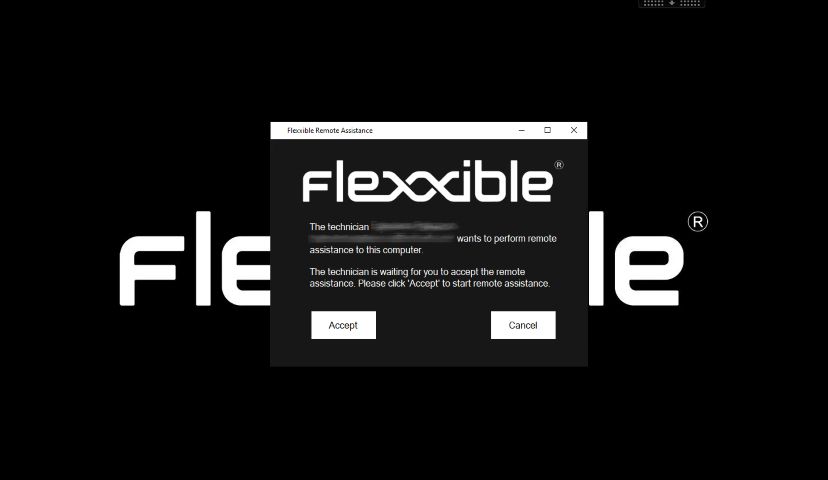
 6. The user will be asked for consent before the operator can take control.
 7. Start remote assistance.
When remote assistance is in progress, the following message appears in the device's detail view:
> *A remote assistance session is currently in progress for this workspace. For more information, refer to the Operations section*.
7. Start remote assistance.
When remote assistance is in progress, the following message appears in the device's detail view:
> *A remote assistance session is currently in progress for this workspace. For more information, refer to the Operations section*.
 For more detailed information about the execution of Flexxible Assist, refer to its documentation.