> ## Documentation Index
> Fetch the complete documentation index at: https://docs.flexxible.com/llms.txt
> Use this file to discover all available pages before exploring further.
# Summary
This feature shows a panel that describes the status of patch application on the organization's devices. From this view, you can obtain quantitative information about Targets and
Workspaces.
## Targets
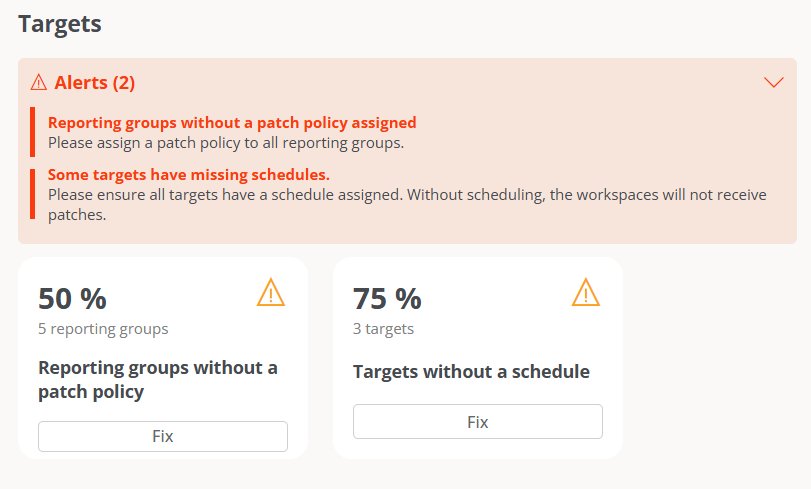
This panel shows the percentage of reporting groups in the organization without a defined patch policy, as well as the percentage of targets without a configured schedule.
When reporting groups without an associated patch policy or targets without a configured schedule are detected, a warning notice is shown (in orange); and when the cause of the notice is resolved, an informational notice is shown (in blue).
 ## Workspaces
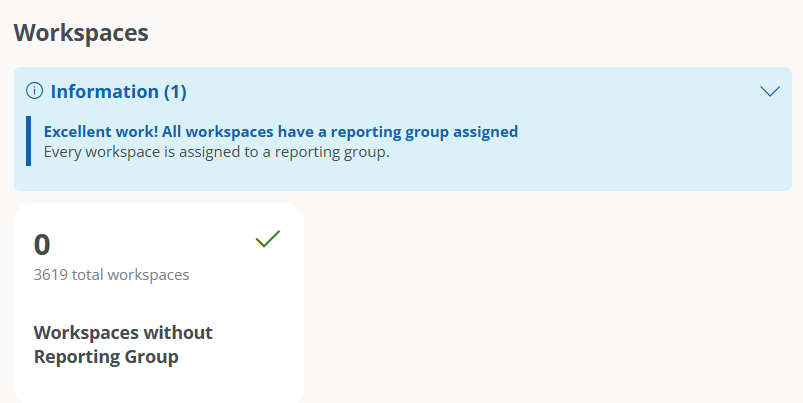
This panel reports on the organization's devices without an assigned reporting group. When FlexxAgent detects this type of device, a warning notice is shown (in orange); and when all devices have an assigned reporting group, it is indicated through an informational notice (in blue).
## Workspaces
This panel reports on the organization's devices without an assigned reporting group. When FlexxAgent detects this type of device, a warning notice is shown (in orange); and when all devices have an assigned reporting group, it is indicated through an informational notice (in blue).