> ## Documentation Index
> Fetch the complete documentation index at: https://docs.flexxible.com/llms.txt
> Use this file to discover all available pages before exploring further.
# Webhooks
**Webhooks** is a feature that allows you to integrate the platform with third-party tools to send notifications when certain events occur in the organization.
Available events:
* Alert triggered
* Microservice executed
* Object created
* Object modified
* Object deleted
* Operation executed
* Operation executed on a workspace
When one of these events occurs, the platform makes an HTTP call to the URL configured by the organization and sends a message with the corresponding information. The destination application can use this data to execute actions such as creating a ticket in an ITSM system, sending a message via Slack or Microsoft Teams, sending an email, among others.
This tool can only be configured by a user with the Organization Administrator role.
## Overview
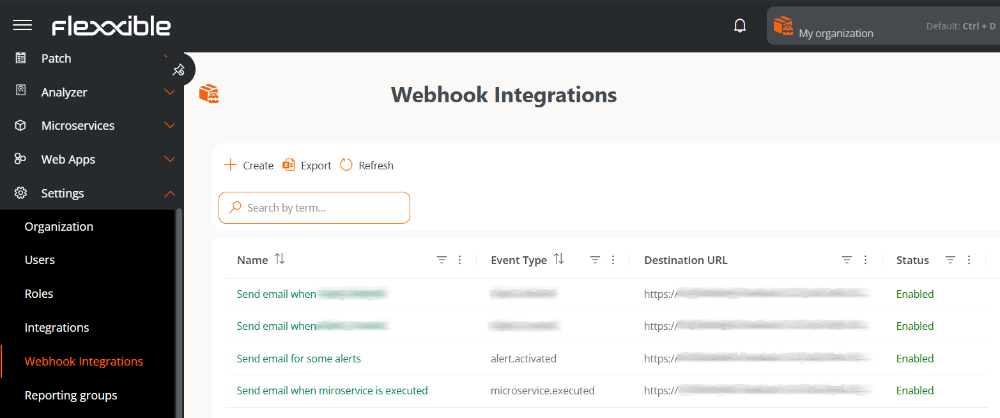
The main screen displays the list of webhooks configured in the organization, indicating whether they are enabled or disabled. The table includes:
* **Name.** Name assigned to the webhook. Clicking accesses its detail view.
* **Event type.** Event that will trigger the webhook.
* **Destination URL.** Address of the external system that receives the event and acts according to the information provided in the message.
* **State.** Indicates whether the webhook is **Enabled** or **Disabled**.
 ## Create a webhook integration
To create a new webhook, follow these steps:
1. Go to **Settings** → **Webhook Integrations**.
2. Click **New**.
3. Fill in and configure each section of the form:
## Create a webhook integration
To create a new webhook, follow these steps:
1. Go to **Settings** → **Webhook Integrations**.
2. Click **New**.
3. Fill in and configure each section of the form:
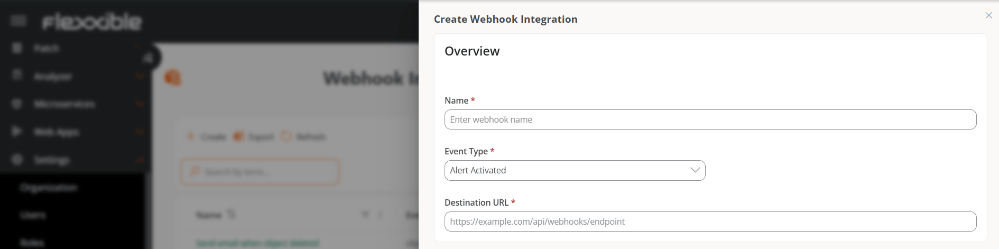 **Overview**
* **Name.** Name assigned to the webhook.
* **Event type.** Event that will trigger the webhook.
* **Destination URL.** Address of the external system that receives the event and acts according to the information provided in the message.
**Elements**
**Overview**
* **Name.** Name assigned to the webhook.
* **Event type.** Event that will trigger the webhook.
* **Destination URL.** Address of the external system that receives the event and acts according to the information provided in the message.
**Elements**
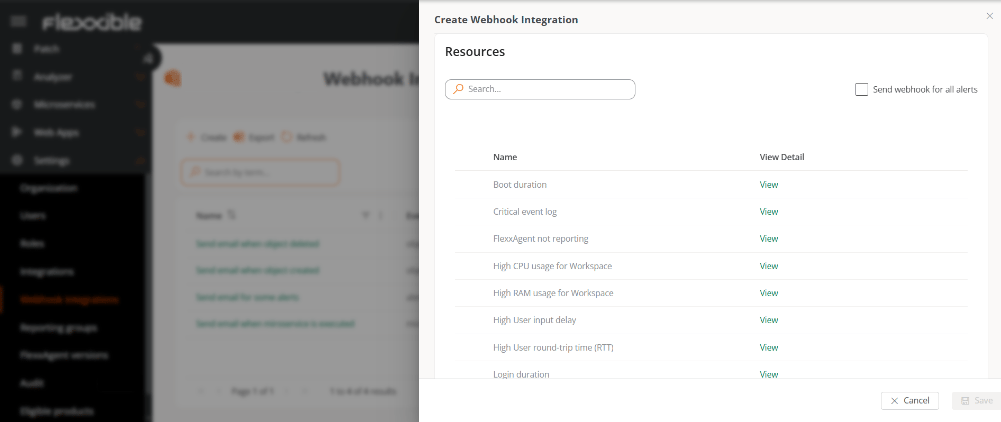 The content of this table depends on the type of event selected.
* **Alert triggered**
* Shows the list of active alerts in the organization to select which ones will send the webhook.
* **Send webhook for all alerts** - Activates the webhook for all alerts.
* **Microservice executed**
* Shows the list of enabled microservices to select which ones will send the webhook.
* **Send webhook for all microservices** - Activates the webhook for all microservices.
* In both cases, the **View** button allows you to access the resource's detail view.
* **Object created**, **Object modified**, or **Object deleted**
* Show a list to select the object that will send the webhook after the corresponding action.
* **Send webhook for all objects** - Activates the webhook for all objects.
* **Operation executed**
* Shows a list to select the operation that will send the webhook when executed.
* **Send webhook for all operations** - Activates the webhook for all operations.
* **Operation executed on a workspace**
* Shows a list to select the operation that will send a webhook for each device on which it has been executed.
* **Send webhooks for all operations executed on each workspace** - Activates the webhook for all operations per device.
- Operations can be executed on one or more devices.
- The **Operation executed** event allows sending a webhook at the global level.
- The **Operation executed on a workspace** event allows sending a webhook for each of the devices on which the operation was executed.
Example:
If the **Restart** operation is executed on three devices simultaneously, the following will be generated:
* One webhook notification of type **Operation executed**.
* Three webhook notifications of type **Operation executed on a workspace**.
**Message configuration**
The content of this table depends on the type of event selected.
* **Alert triggered**
* Shows the list of active alerts in the organization to select which ones will send the webhook.
* **Send webhook for all alerts** - Activates the webhook for all alerts.
* **Microservice executed**
* Shows the list of enabled microservices to select which ones will send the webhook.
* **Send webhook for all microservices** - Activates the webhook for all microservices.
* In both cases, the **View** button allows you to access the resource's detail view.
* **Object created**, **Object modified**, or **Object deleted**
* Show a list to select the object that will send the webhook after the corresponding action.
* **Send webhook for all objects** - Activates the webhook for all objects.
* **Operation executed**
* Shows a list to select the operation that will send the webhook when executed.
* **Send webhook for all operations** - Activates the webhook for all operations.
* **Operation executed on a workspace**
* Shows a list to select the operation that will send a webhook for each device on which it has been executed.
* **Send webhooks for all operations executed on each workspace** - Activates the webhook for all operations per device.
- Operations can be executed on one or more devices.
- The **Operation executed** event allows sending a webhook at the global level.
- The **Operation executed on a workspace** event allows sending a webhook for each of the devices on which the operation was executed.
Example:
If the **Restart** operation is executed on three devices simultaneously, the following will be generated:
* One webhook notification of type **Operation executed**.
* Three webhook notifications of type **Operation executed on a workspace**.
**Message configuration**
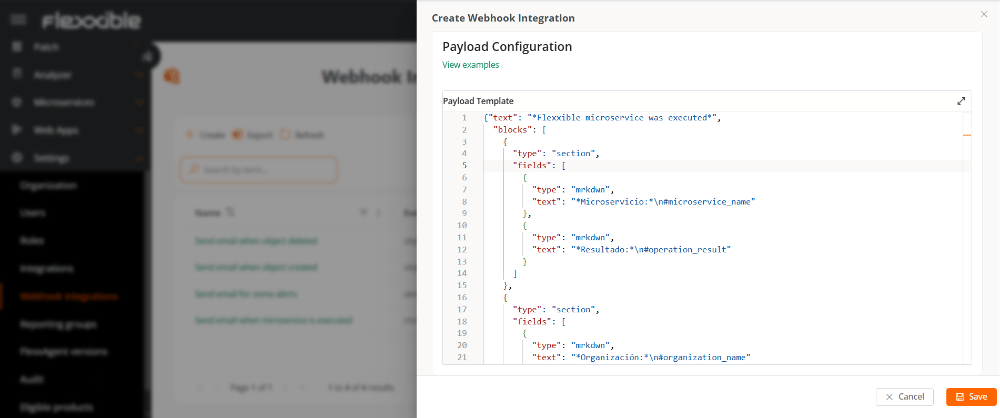 In this section, the message to be sent when the event occurs is defined. The configuration uses JSON format and determines the structure and content of the message transmitted to the external system.
The variables are automatically replaced by real values when the event occurs.
4. Click **Save**.
An organization should not have two webhooks with the same configuration because it could generate duplicate submissions.
## Variables available for the message
### All event types
| Variables | Description |
| :------------------ | :------------------------------------ |
| #event\_type | Event type |
| #organization\_id | Organization ID |
| #organization\_name | Organization/tenant name |
| #timestamp | Date and time of the event (ISO 8601) |
### Alert triggered
| Variables | Description |
| :--------------------------------- | :----------------------------------------- |
| #alert\_name | Alert name |
| #alert\_information | Additional information about the alert |
| #alert\_start | Date and time the alert started (ISO 8601) |
| #alert\_element | Element that triggered the alert |
| #workspace\_id | Workspace ID |
| #workspace\_name | Workspace name |
| #workspace\_last\_user | Last user who used the workspace |
| #workspace\_reporting\_group\_id | Reporting group ID |
| #workspace\_reporting\_group\_name | Reporting group name |
| #workspace\_internal\_id | Workspace internal ID |
#### Template example
```
{
"message": {
"event_type": "#event_type",
"organization_id": "#organization_id",
"organization_name": "#organization_name",
"workspace_id": "#workspace_id",
"workspace_name": "#workspace_name",
"workspace_last_user": "#workspace_last_user",
"reporting_group_id": "#workspace_reporting_group_id",
"reporting_group_name": "#workspace_reporting_group_name",
"alert_name": "#alert_name",
"alert_information": "#alert_information",
"alert_start": "#alert_start",
"alert_element": "#alert_element",
"timestamp": "#timestamp"
}
}
```
### Microservice executed
| Variables | Description |
| :--------------------------------- | :------------------------------------------------------------------------- |
| #operation\_id | ID of the executed operation |
| #microservice\_id | Microservice ID |
| #microservice\_name | Microservice name |
| #operation\_startdate | Date and time the operation started (ISO 8601) |
| #operation\_enddate | Date and time the operation ended (ISO 8601) |
| #operation\_result | Operation result (**Completed**, **Error**, **Timeout**, or **Cancelled**) |
| #workspace\_id | Workspace ID |
| #workspace\_name | Workspace name |
| #workspace\_last\_user | Last user who used the workspace |
| #workspace\_reporting\_group\_id | Reporting group ID |
| #workspace\_reporting\_group\_name | Reporting group name |
| #operation\_startedby | User or component that started the execution of the microservice |
| #workspace\_internal\_id | Workspace internal ID |
#### Template example
```
{
"message": {
"event_type" : "#event_type",
"organization_id" : "#organization_id",
"organization_name" : "#organization_name",
"timestamp" : "#timestamp",
"workspace_id" : "#workspace_id",
"workspace_name" : "#workspace_name",
"workspace_last_user" : "#workspace_last_user",
"reporting_group_id" : "#workspace_reporting_group_id",
"reporting_group_name" : "#workspace_reporting_group_name",
"operation_id": "#operation_id",
"microservice_id": "#microservice_id",
"microservice_name": "#microservice_name",
"operation_startdate": "#operation_startdate",
"operation_enddate": "#operation_enddate",
"operation_result": "#operation_result"
}
}
```
### Object created, modified, or deleted
| Variables | Description |
| :-------------------- | :----------------------------------------------------- |
| #event\_type | Event type |
| #organization\_id | Organization ID |
| #organization\_name | Organization/tenant name |
| #timestamp | Date and time of the event (ISO 8601) |
| #entity\_type | Entity type |
| #entity\_name | Entity name |
| #entity\_id | Entity ID |
| #action | Action performed (Creation, Modification, or Deletion) |
| #triggered\_by\_name | Name of the user who triggered the event |
| #triggered\_by\_email | Email address of the user who triggered the event |
| #triggered\_by\_id | ID of the user who triggered the event |
#### Template example
```
{
"message": {
"event-type": "#event_type",
"organization": {
"id": "#organization_id",
"name": "#organization_name"
},
"entity": {
"entity-type": "#entity_type",
"object-name": "#entity_name",
"object-id": "#entity_id"
},
"metadata": {
"action": "#action",
"timestamp": "#timestamp",
"user-name": "#triggered_by_name",
"useremail": "#triggered_by_email",
"user-id": "#triggered_by_id"
}
}
}
```
### Operation executed
| Variables | Description |
| :------------------ | :----------------------------------------------------------------- |
| #event\_type | Event type |
| #timestamp | Date and time of the event (ISO 8601) |
| #organization\_id | Organization ID |
| #organization\_name | Organization/tenant name |
| #operation\_type | Operation type |
| #description | Operation description |
| #status | Current state of the operation's execution |
| #summary | Operation summary (JSON) |
| #started\_by | User who started the operation |
| #created\_at | Date and time the operation was created (ISO 8601) |
| #started\_at | Date and time the operation started (ISO 8601) |
| #finished\_at | Date and time the operation finished (ISO 8601) |
| #total\_workspaces | Total number of workspaces processed |
| #total\_warnings | Total number of executions with warnings during the operation |
| #total\_errors | Total number of executions with errors during the operation |
| #flow\_id | Associated flow ID |
| #microservice\_id | Associated microservice ID |
| #fra\_type | Flexxible Remote Assistance (FRA) type |
| #fra\_start | Date and time Flexxible Remote Assistance (FRA) started (ISO 8601) |
| #fra\_end | Date and time Flexxible Remote Assistance (FRA) ended (ISO 8601) |
#### Template example
```
{
"message": {
"event_type": "#event_type",
"timestamp": "#timestamp",
"organization": {
"id": "#organization_id",
"name": "#organization_name"
},
"operation": {
"type": "#operation_type",
"description": "#description",
"status": "#status",
"summary": "#summary",
"started_by": "#started_by",
"created_at": "#created_at",
"started_at": "#started_at",
"finished_at": "#finished_at"
},
"results": {
"total_workspaces": "#total_workspaces",
"total_warnings": "#total_warnings",
"total_errors": "#total_errors"
},
"context": {
"flow_id": "#flow_id",
"microservice_id": "#microservice_id",
"fra_type": "#fra_type",
"fra_start": "#fra_start",
"fra_end": "#fra_end"
}
}
}
```
### Operation executed on a workspace
| Variables | Description |
| :--------------------------------- | :----------------------------------------------------------------- |
| #event\_type | Event type |
| #timestamp | Date and time of the event (ISO 8601) |
| #organization\_id | Organization ID |
| #organization\_name | Organization/tenant name |
| #operation\_type | Operation type |
| #description | Operation description |
| #operation\_status | Operation state |
| #started\_by | User who started the operation |
| #created\_at | Date and time the operation was created (ISO 8601) |
| #started\_at | Date and time the operation started (ISO 8601) |
| #finished\_at | Date and time the operation ended (ISO 8601) |
| #operation\_flow\_id | ID of the flow associated with the operation |
| #operation\_microservice\_id | ID of the microservice associated with the operation |
| #operation\_fra\_type | Flexxible Remote Assistance (FRA) type |
| #operation\_fra\_start | Date and time Flexxible Remote Assistance (FRA) started (ISO 8601) |
| #operation\_fra\_end | Date and time Flexxible Remote Assistance (FRA) ended (ISO 8601) |
| #workspace\_id | Workspace ID |
| #workspace\_name | Workspace name |
| #workspace\_last\_user | Last user who used the workspace |
| #workspace\_reporting\_group\_id | Reporting group ID |
| #workspace\_reporting\_group\_name | Reporting group name |
| #workspace\_operation\_result | Result of the operation on the workspace |
| #workspace\_operation\_startdate | Date and time the operation started on the workspace (ISO 8601) |
| #workspace\_operation\_enddate | Date and time the operation ended on the workspace (ISO 8601) |
| #workspace\_internal\_id | Workspace internal ID |
#### Template example
```
{
"message": {
"event_type": "#event_type",
"timestamp": "#timestamp",
"organization": {
"id": "#organization_id",
"name": "#organization_name"
},
"operation": {
"type": "#operation_type",
"description": "#description",
"status": "#operation_status",
"started_by": "#started_by",
"created_at": "#created_at",
"started_at": "#started_at",
"finished_at": "#finished_at"
},
"context": {
"flow_id": "#operation_flow_id",
"microservice_id": "#operation_microservice_id",
"fra_type": "#operation_fra_type",
"fra_start": "#operation_fra_start",
"fra_end": "#operation_fra_end"
},
"workspace": {
"id": "#workspace_id",
"name": "#workspace_name",
"last_user": "#workspace_last_user",
"reporting_group": {
"id": "#workspace_reporting_group_id",
"name": "#workspace_reporting_group_name"
}
},
"execution": {
"result": "#workspace_operation_result",
"start_date": "#workspace_operation_startdate",
"end_date": "#workspace_operation_enddate"
}
}
}
```
### Slack
Below is an example of a template compatible with Slack Incoming Webhooks, which can be used as a basis for building the message sent from the platform:
```
{
"text": "*Flexxible microservice was executed*",
"blocks": [
{
"type": "section",
"fields": [
{
"type": "mrkdwn",
"text": "*Microservicio:*\n#microservice_name"
},
{
"type": "mrkdwn",
"text": "*Resultado:*\n#operation_result"
}
]
},
{
"type": "section",
"fields": [
{
"type": "mrkdwn",
"text": "*Organización:*\n#organization_name"
},
{
"type": "mrkdwn",
"text": "*Workspace:*\n#workspace_name"
}
]
},
{
"type": "section",
"fields": [
{
"type": "mrkdwn",
"text": "*Inicio:*\n#operation_startdate"
},
{
"type": "mrkdwn",
"text": "*Fin:*\n#operation_enddate"
}
]
}
]
}
```
For more information on message format, available blocks, and best practices, see the [official Slack guide](https://docs.slack.dev/messaging/sending-messages-using-incoming-webhooks/).
### Microsoft Teams
In Microsoft Teams, templates can be consulted directly from the configuration of each channel.
For details on how to correctly configure an incoming webhook and what structure the JSON template should have, see the [official Microsoft guide.](https://support.microsoft.com/en-us/office/create-incoming-webhooks-with-workflows-for-microsoft-teams-8ae491c7-0394-4861-ba59-055e33f75498)
## Detail view
When selecting a webhook from the table, you access its detail view:
* Overview
* Metrics
### Overview
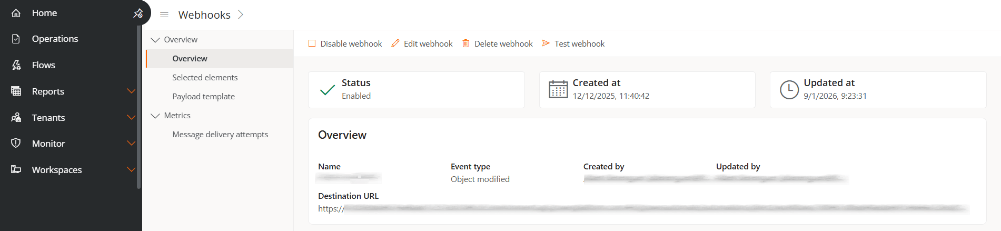
Presents cards with basic information: **State**, **Created on**, and **Updated on**.
In this section, the message to be sent when the event occurs is defined. The configuration uses JSON format and determines the structure and content of the message transmitted to the external system.
The variables are automatically replaced by real values when the event occurs.
4. Click **Save**.
An organization should not have two webhooks with the same configuration because it could generate duplicate submissions.
## Variables available for the message
### All event types
| Variables | Description |
| :------------------ | :------------------------------------ |
| #event\_type | Event type |
| #organization\_id | Organization ID |
| #organization\_name | Organization/tenant name |
| #timestamp | Date and time of the event (ISO 8601) |
### Alert triggered
| Variables | Description |
| :--------------------------------- | :----------------------------------------- |
| #alert\_name | Alert name |
| #alert\_information | Additional information about the alert |
| #alert\_start | Date and time the alert started (ISO 8601) |
| #alert\_element | Element that triggered the alert |
| #workspace\_id | Workspace ID |
| #workspace\_name | Workspace name |
| #workspace\_last\_user | Last user who used the workspace |
| #workspace\_reporting\_group\_id | Reporting group ID |
| #workspace\_reporting\_group\_name | Reporting group name |
| #workspace\_internal\_id | Workspace internal ID |
#### Template example
```
{
"message": {
"event_type": "#event_type",
"organization_id": "#organization_id",
"organization_name": "#organization_name",
"workspace_id": "#workspace_id",
"workspace_name": "#workspace_name",
"workspace_last_user": "#workspace_last_user",
"reporting_group_id": "#workspace_reporting_group_id",
"reporting_group_name": "#workspace_reporting_group_name",
"alert_name": "#alert_name",
"alert_information": "#alert_information",
"alert_start": "#alert_start",
"alert_element": "#alert_element",
"timestamp": "#timestamp"
}
}
```
### Microservice executed
| Variables | Description |
| :--------------------------------- | :------------------------------------------------------------------------- |
| #operation\_id | ID of the executed operation |
| #microservice\_id | Microservice ID |
| #microservice\_name | Microservice name |
| #operation\_startdate | Date and time the operation started (ISO 8601) |
| #operation\_enddate | Date and time the operation ended (ISO 8601) |
| #operation\_result | Operation result (**Completed**, **Error**, **Timeout**, or **Cancelled**) |
| #workspace\_id | Workspace ID |
| #workspace\_name | Workspace name |
| #workspace\_last\_user | Last user who used the workspace |
| #workspace\_reporting\_group\_id | Reporting group ID |
| #workspace\_reporting\_group\_name | Reporting group name |
| #operation\_startedby | User or component that started the execution of the microservice |
| #workspace\_internal\_id | Workspace internal ID |
#### Template example
```
{
"message": {
"event_type" : "#event_type",
"organization_id" : "#organization_id",
"organization_name" : "#organization_name",
"timestamp" : "#timestamp",
"workspace_id" : "#workspace_id",
"workspace_name" : "#workspace_name",
"workspace_last_user" : "#workspace_last_user",
"reporting_group_id" : "#workspace_reporting_group_id",
"reporting_group_name" : "#workspace_reporting_group_name",
"operation_id": "#operation_id",
"microservice_id": "#microservice_id",
"microservice_name": "#microservice_name",
"operation_startdate": "#operation_startdate",
"operation_enddate": "#operation_enddate",
"operation_result": "#operation_result"
}
}
```
### Object created, modified, or deleted
| Variables | Description |
| :-------------------- | :----------------------------------------------------- |
| #event\_type | Event type |
| #organization\_id | Organization ID |
| #organization\_name | Organization/tenant name |
| #timestamp | Date and time of the event (ISO 8601) |
| #entity\_type | Entity type |
| #entity\_name | Entity name |
| #entity\_id | Entity ID |
| #action | Action performed (Creation, Modification, or Deletion) |
| #triggered\_by\_name | Name of the user who triggered the event |
| #triggered\_by\_email | Email address of the user who triggered the event |
| #triggered\_by\_id | ID of the user who triggered the event |
#### Template example
```
{
"message": {
"event-type": "#event_type",
"organization": {
"id": "#organization_id",
"name": "#organization_name"
},
"entity": {
"entity-type": "#entity_type",
"object-name": "#entity_name",
"object-id": "#entity_id"
},
"metadata": {
"action": "#action",
"timestamp": "#timestamp",
"user-name": "#triggered_by_name",
"useremail": "#triggered_by_email",
"user-id": "#triggered_by_id"
}
}
}
```
### Operation executed
| Variables | Description |
| :------------------ | :----------------------------------------------------------------- |
| #event\_type | Event type |
| #timestamp | Date and time of the event (ISO 8601) |
| #organization\_id | Organization ID |
| #organization\_name | Organization/tenant name |
| #operation\_type | Operation type |
| #description | Operation description |
| #status | Current state of the operation's execution |
| #summary | Operation summary (JSON) |
| #started\_by | User who started the operation |
| #created\_at | Date and time the operation was created (ISO 8601) |
| #started\_at | Date and time the operation started (ISO 8601) |
| #finished\_at | Date and time the operation finished (ISO 8601) |
| #total\_workspaces | Total number of workspaces processed |
| #total\_warnings | Total number of executions with warnings during the operation |
| #total\_errors | Total number of executions with errors during the operation |
| #flow\_id | Associated flow ID |
| #microservice\_id | Associated microservice ID |
| #fra\_type | Flexxible Remote Assistance (FRA) type |
| #fra\_start | Date and time Flexxible Remote Assistance (FRA) started (ISO 8601) |
| #fra\_end | Date and time Flexxible Remote Assistance (FRA) ended (ISO 8601) |
#### Template example
```
{
"message": {
"event_type": "#event_type",
"timestamp": "#timestamp",
"organization": {
"id": "#organization_id",
"name": "#organization_name"
},
"operation": {
"type": "#operation_type",
"description": "#description",
"status": "#status",
"summary": "#summary",
"started_by": "#started_by",
"created_at": "#created_at",
"started_at": "#started_at",
"finished_at": "#finished_at"
},
"results": {
"total_workspaces": "#total_workspaces",
"total_warnings": "#total_warnings",
"total_errors": "#total_errors"
},
"context": {
"flow_id": "#flow_id",
"microservice_id": "#microservice_id",
"fra_type": "#fra_type",
"fra_start": "#fra_start",
"fra_end": "#fra_end"
}
}
}
```
### Operation executed on a workspace
| Variables | Description |
| :--------------------------------- | :----------------------------------------------------------------- |
| #event\_type | Event type |
| #timestamp | Date and time of the event (ISO 8601) |
| #organization\_id | Organization ID |
| #organization\_name | Organization/tenant name |
| #operation\_type | Operation type |
| #description | Operation description |
| #operation\_status | Operation state |
| #started\_by | User who started the operation |
| #created\_at | Date and time the operation was created (ISO 8601) |
| #started\_at | Date and time the operation started (ISO 8601) |
| #finished\_at | Date and time the operation ended (ISO 8601) |
| #operation\_flow\_id | ID of the flow associated with the operation |
| #operation\_microservice\_id | ID of the microservice associated with the operation |
| #operation\_fra\_type | Flexxible Remote Assistance (FRA) type |
| #operation\_fra\_start | Date and time Flexxible Remote Assistance (FRA) started (ISO 8601) |
| #operation\_fra\_end | Date and time Flexxible Remote Assistance (FRA) ended (ISO 8601) |
| #workspace\_id | Workspace ID |
| #workspace\_name | Workspace name |
| #workspace\_last\_user | Last user who used the workspace |
| #workspace\_reporting\_group\_id | Reporting group ID |
| #workspace\_reporting\_group\_name | Reporting group name |
| #workspace\_operation\_result | Result of the operation on the workspace |
| #workspace\_operation\_startdate | Date and time the operation started on the workspace (ISO 8601) |
| #workspace\_operation\_enddate | Date and time the operation ended on the workspace (ISO 8601) |
| #workspace\_internal\_id | Workspace internal ID |
#### Template example
```
{
"message": {
"event_type": "#event_type",
"timestamp": "#timestamp",
"organization": {
"id": "#organization_id",
"name": "#organization_name"
},
"operation": {
"type": "#operation_type",
"description": "#description",
"status": "#operation_status",
"started_by": "#started_by",
"created_at": "#created_at",
"started_at": "#started_at",
"finished_at": "#finished_at"
},
"context": {
"flow_id": "#operation_flow_id",
"microservice_id": "#operation_microservice_id",
"fra_type": "#operation_fra_type",
"fra_start": "#operation_fra_start",
"fra_end": "#operation_fra_end"
},
"workspace": {
"id": "#workspace_id",
"name": "#workspace_name",
"last_user": "#workspace_last_user",
"reporting_group": {
"id": "#workspace_reporting_group_id",
"name": "#workspace_reporting_group_name"
}
},
"execution": {
"result": "#workspace_operation_result",
"start_date": "#workspace_operation_startdate",
"end_date": "#workspace_operation_enddate"
}
}
}
```
### Slack
Below is an example of a template compatible with Slack Incoming Webhooks, which can be used as a basis for building the message sent from the platform:
```
{
"text": "*Flexxible microservice was executed*",
"blocks": [
{
"type": "section",
"fields": [
{
"type": "mrkdwn",
"text": "*Microservicio:*\n#microservice_name"
},
{
"type": "mrkdwn",
"text": "*Resultado:*\n#operation_result"
}
]
},
{
"type": "section",
"fields": [
{
"type": "mrkdwn",
"text": "*Organización:*\n#organization_name"
},
{
"type": "mrkdwn",
"text": "*Workspace:*\n#workspace_name"
}
]
},
{
"type": "section",
"fields": [
{
"type": "mrkdwn",
"text": "*Inicio:*\n#operation_startdate"
},
{
"type": "mrkdwn",
"text": "*Fin:*\n#operation_enddate"
}
]
}
]
}
```
For more information on message format, available blocks, and best practices, see the [official Slack guide](https://docs.slack.dev/messaging/sending-messages-using-incoming-webhooks/).
### Microsoft Teams
In Microsoft Teams, templates can be consulted directly from the configuration of each channel.
For details on how to correctly configure an incoming webhook and what structure the JSON template should have, see the [official Microsoft guide.](https://support.microsoft.com/en-us/office/create-incoming-webhooks-with-workflows-for-microsoft-teams-8ae491c7-0394-4861-ba59-055e33f75498)
## Detail view
When selecting a webhook from the table, you access its detail view:
* Overview
* Metrics
### Overview
Presents cards with basic information: **State**, **Created on**, and **Updated on**.
 #### 1. Overview
* **Name.** Name assigned to the webhook.
* **Event type.** Event that will trigger the webhook.
* **Created by.** User who created the event.
* **Updated by.** Last user who modified the webhook.
* **Destination URL.** Address of the external system that receives the event and acts according to the information provided in the message.
#### 2. Selected resources
Shows the resources associated according to the event type.
#### 3. Message template
Displays the JSON structure configured for the webhook.
### Metrics
#### Message delivery attempts
This tab presents two levels of information. At the top, summary cards are shown with the overall status of the messages sent through the webhook:
* Successful messages
* Pending messages
* Messages in progress
* Failed messages
* Total messages
* Success rate
#### 1. Overview
* **Name.** Name assigned to the webhook.
* **Event type.** Event that will trigger the webhook.
* **Created by.** User who created the event.
* **Updated by.** Last user who modified the webhook.
* **Destination URL.** Address of the external system that receives the event and acts according to the information provided in the message.
#### 2. Selected resources
Shows the resources associated according to the event type.
#### 3. Message template
Displays the JSON structure configured for the webhook.
### Metrics
#### Message delivery attempts
This tab presents two levels of information. At the top, summary cards are shown with the overall status of the messages sent through the webhook:
* Successful messages
* Pending messages
* Messages in progress
* Failed messages
* Total messages
* Success rate
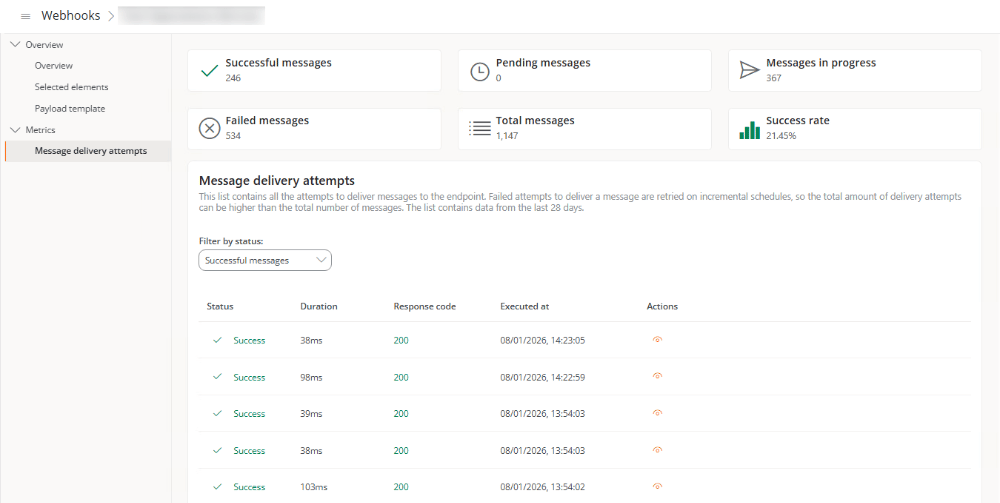 At the bottom, a table shows the history of message send attempts corresponding to the last 28 days. The records can be filtered according to the following criteria: **All attempts**, **Successful attempts**, **Pending attempts**, **Failed attempts**, and **Attempts in progress**.
The table includes the following information:
* **State.** Result of the execution.
* **Duration.** In milliseconds, time it took for the webhook to run.
* **Response code.** HTTP code returned when the webhook was executed.
* **Executed on.** Date and time the execution took place.
* **Actions.** Opens a window with the details of the execution.
When a call to the destination URL does not complete successfully, the system automatically retries the message according to the following schedule:
* Immediately
* After 5 seconds
* After 5 minutes
* After 30 minutes
* After 2 hours
* After 5 hours
* After 10 hours
* After 10 hours (additional)
Each interval starts from the failure of the previous attempt.
If a message send fails three times and completes successfully on the fourth attempt, four attempts will be displayed in the table (three failed and one successful). However, the system will count it as a single message.
## Actions on webhooks
The detail view also allows you to perform the following actions on the webhook:
At the bottom, a table shows the history of message send attempts corresponding to the last 28 days. The records can be filtered according to the following criteria: **All attempts**, **Successful attempts**, **Pending attempts**, **Failed attempts**, and **Attempts in progress**.
The table includes the following information:
* **State.** Result of the execution.
* **Duration.** In milliseconds, time it took for the webhook to run.
* **Response code.** HTTP code returned when the webhook was executed.
* **Executed on.** Date and time the execution took place.
* **Actions.** Opens a window with the details of the execution.
When a call to the destination URL does not complete successfully, the system automatically retries the message according to the following schedule:
* Immediately
* After 5 seconds
* After 5 minutes
* After 30 minutes
* After 2 hours
* After 5 hours
* After 10 hours
* After 10 hours (additional)
Each interval starts from the failure of the previous attempt.
If a message send fails three times and completes successfully on the fourth attempt, four attempts will be displayed in the table (three failed and one successful). However, the system will count it as a single message.
## Actions on webhooks
The detail view also allows you to perform the following actions on the webhook:
 ### Enable / Disable
Enables or disables the webhook according to its current state.
Webhooks are disabled by default.
### Edit
Allows you to modify:
* Name
* Event type
* Destination URL
* Resources
* Message template
### Delete
Permanently deletes the webhook. This action cannot be undone.
### Test
Sends a message with the template contents to the configured URL without replacing the variables with real values. The purpose of this action is to validate connectivity and message format.
### Enable / Disable
Enables or disables the webhook according to its current state.
Webhooks are disabled by default.
### Edit
Allows you to modify:
* Name
* Event type
* Destination URL
* Resources
* Message template
### Delete
Permanently deletes the webhook. This action cannot be undone.
### Test
Sends a message with the template contents to the configured URL without replacing the variables with real values. The purpose of this action is to validate connectivity and message format.