> ## Documentation Index
> Fetch the complete documentation index at: https://docs.flexxible.com/llms.txt
> Use this file to discover all available pages before exploring further.
# M365 pricing
This section lets you view and manage the prices used to calculate the costs and potential savings related to Microsoft 365 licenses.
The amounts configured in this table are used as a reference in the information panels of the [Microsoft 365 summary](m365-summary) section and in the reports generated for the licensing optimization categories.
When Microsoft 365 licensing is enabled, the platform automatically creates a table with default prices for the detected licenses. However, these values can be modified to match the organization's actual costs.
 ## Table information
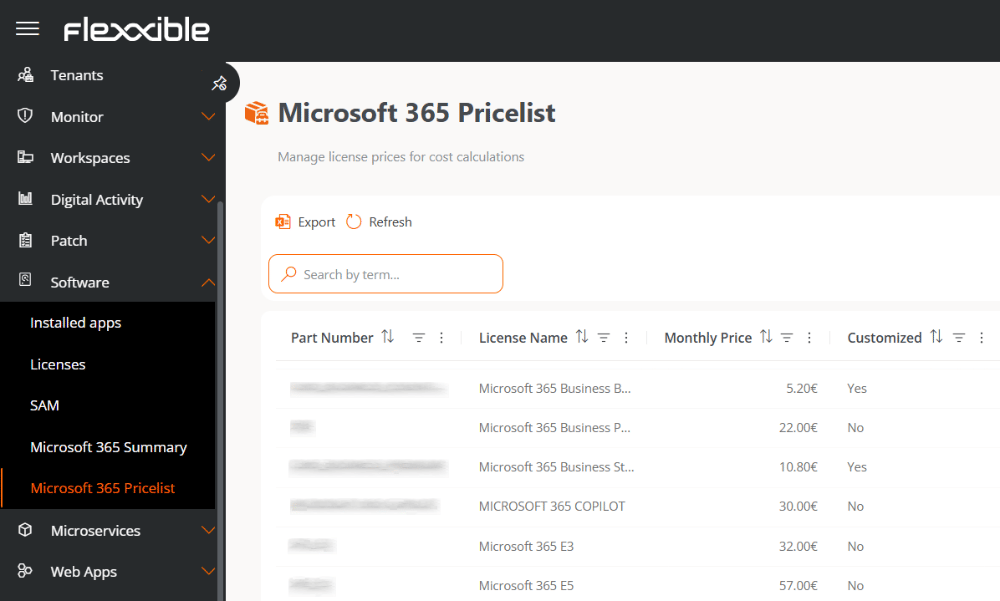
The table shows the following information:
* **Product code.** License reference code.
* **License.** License name.
* **Monthly price.** Monthly price used for savings and optimization calculations.
* **Default price.** Indicates whether the price corresponds to the default value provided by the platform or to a custom value defined by the organization.
## Modify the monthly price
The **Monthly price** column lets you directly edit the amount used for cost and potential savings calculations.
To modify a value, double-click the corresponding cell and enter the new amount.
## Table information
The table shows the following information:
* **Product code.** License reference code.
* **License.** License name.
* **Monthly price.** Monthly price used for savings and optimization calculations.
* **Default price.** Indicates whether the price corresponds to the default value provided by the platform or to a custom value defined by the organization.
## Modify the monthly price
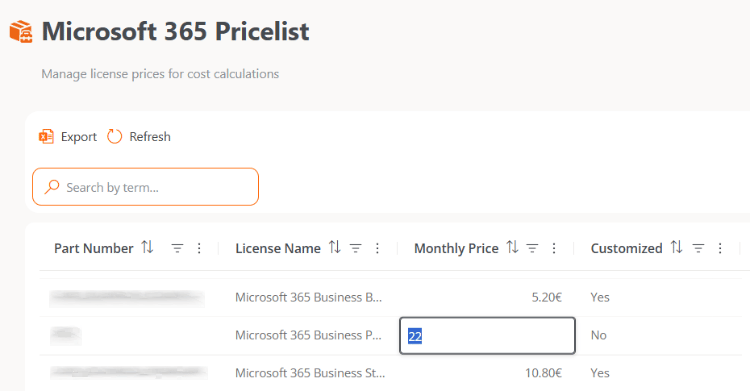
The **Monthly price** column lets you directly edit the amount used for cost and potential savings calculations.
To modify a value, double-click the corresponding cell and enter the new amount.
 Changes made to prices are not reflected immediately. The new values will be applied during the next synchronization process, which runs automatically once a week.
Synchronization runs are recorded in the [Operations](../../traceability/operations) section.
Changes made to prices are not reflected immediately. The new values will be applied during the next synchronization process, which runs automatically once a week.
Synchronization runs are recorded in the [Operations](../../traceability/operations) section.